How to Scrape Glassdoor: Tools, Methods, and Tips
Every Glassdoor scraping tutorial that uses Selenium or Playwright fails for the same reason: Cloudflare anti-bot protection fingerprints the TLS connection and blocks non-browser traffic. Glassdoor has internal API endpoints that return the same structured JSON that the frontend uses, without rendering a page. Because these endpoints accept standard HTTP calls, you can bypass Cloudflare by calling them with Python and curl_cffi for browser-grade TLS fingerprinting, plus Decodo residential proxies for IP rotation. This guide covers 4 complete scrapers for reviews, jobs, interviews, and company profiles.

Justinas Tamasevicius
Last updated: Apr 13, 2026
15 min read
TL;DR
Skip the browser entirely. The Glassdoor BFF API returns structured JSON that curl_cffi can fetch with browser-grade TLS fingerprinting – no HTML parsing, no login overlays.
- curl_cffi with chrome136 fingerprinting passes Cloudflare where Requests and Playwright fail.
- Sticky proxies for session bootstrap, rotating proxies for data collection.
- 4 scrapers covering reviews, jobs, interviews, and company profiles with structured JSON output.
- CSV and JSON export with deduplication and error handling built in.
Why scrape Glassdoor? Use cases for scraped data
Glassdoor is one of the richest public sources of employer data on the internet. At scale, Glassdoor data supports 3 categories of analysis.
Market research and competitive intelligence
- Employer brand tracking. Compare how employees rate your company vs. competitors across culture, compensation, and work-life balance. Track these ratings quarterly to identify trends before they appear in hiring metrics.
- Compensation benchmarking. Job listings include salary estimates by role and location. Cross-reference with web scraping job postings from other platforms for more complete market data.
- Employee sentiment by sector. Aggregate review ratings across an entire industry (for example, all SaaS companies with 500-2000 employees) to identify whether sentiment is company-specific or sector-wide.
- Competitive intelligence dashboards. Load scraped data into business intelligence tools to track competitor employer brands over time.
These data points are available on every company profile, so scaling the analysis across dozens of competitors takes minutes, not weeks.
Recruitment and HR analytics
- Candidate expectations. Interview experience data shows what candidates expect: difficulty level, process length, and the questions they'll be asked. Use this data to calibrate your own hiring process.
- Employer brand monitoring. Track your own company's Glassdoor reviews in real time. A spike in negative reviews can signal internal problems before leadership notices them.
- Red flag detection. Look for high turnover signals: frequent reviews from "Former Employee" accounts, or declining CEO approval ratings. These patterns can indicate cultural problems at competitors.
- Talent acquisition strategy. Interview data shows how candidates found each company (online application, recruiter, employee referral), showing which sourcing channels result in hires.
Together, these signals give HR teams a real-time view of how candidates perceive the hiring experience.
Investment research and due diligence
- Employee sentiment as a leading indicator. Declining Glassdoor ratings can precede public performance issues by months. If a portfolio company's CEO approval drops from 85% to 60%, it needs closer examination.
- Hiring velocity. Job listing volume is an indicator of growth. A company posting 200 engineering roles is in a different phase than one posting 10.
- CEO approval and management sentiment. The CEO approval percentage and business outlook data from company profiles show internal confidence levels.
- Culture due diligence. Before an acquisition, scrape the target company's reviews to identify culture issues that won't appear in financial statements. Combine with data from other employer review platforms for a more complete picture of the talent market.
Glassdoor data adds a layer of employee-level insight that financial filings and press releases don't capture.
Example use case: A venture capital firm tracking a portfolio company's Glassdoor reviews over time. Analysts can use review frequency, rating trends, and sentiment keywords to detect early signs of culture deterioration or management changes.
Prerequisites and environment setup
You need Python 3.9+, the curl_cffi library, and a residential proxy account.
Python environment
Create a virtual environment and install the only dependency:
Why curl_cffi instead of Requests or httpx? Regular HTTP libraries send generic TLS fingerprints that Cloudflare flags as non-browser traffic. The Python binding curl_cffi impersonates specific browser versions at the TLS level. Because curl_cffi matches the exact cipher suites, extensions, and HTTP/2 settings of a real Chrome browser, it bypasses Cloudflare at the TLS level.
You don't need an actual browser, and you don't need a headless browser like Playwright or Puppeteer.
Test the scraper first
If you want results before the detailed walkthrough, this is the fastest way:
- Install the only dependency with: pip install curl_cffi
- Download any scraper (for example, reviews) from the Full Source Code section or download all files
- Run it using the command: python glassdoor_reviews.py --company Amazon --pages 2 --format json
The scraper handles session bootstrap, Cloudflare bypass, pagination, and data export automatically. The scraper saves the output file to your current directory, named after the company: Amazon_reviews.json (or .csv). Use --output custom_name to override the default filename. Running the same command again overwrites the previous file.
This command runs without proxies – enough for a 2-page test. Without proxies, Glassdoor rate-limits (429) on most requests from the same IP. The scraper retries automatically, but collection is slow. To scale up, add your Decodo proxy credentials:
The rest of this guide explains how each part works: BFF (Backend for Frontend) API discovery, TLS fingerprinting, proxy strategy, anti-bot bypass, and data quality issues. The code snippets throughout are for explanation – they highlight key decisions and patterns. You don't need to assemble them. The complete working scrapers are available as single-file downloads in the Full scraper source code section below.
Proxy setup
Without proxies, Glassdoor returns 429 rate-limit responses on most requests. The scraper retries, but it's slow. Residential proxies are essential. Cloudflare identifies and blocks datacenter IPs almost immediately.

The scrapers in this guide use Decodo rotating residential proxies with 2 modes. After signing up, follow the residential proxy setup guide (3-day free trial available) to find your username and password. The username and password are the --proxy-user and --proxy-pass values used in the command-line interface examples.
- Sticky sessions (same IP for a set duration, for example 30 minutes) – used during session bootstrap when cookies need to stay tied to 1 IP
- Rotating sessions (new IP per request) – used for data collection to distribute load across IPs
The build_proxy_url function handles both modes with a single sticky flag:
The country parameter routes your requests through an IP in that region. Scraping glassdoor.co.uk with a US IP may return unexpected results because Glassdoor serves different content per region.
Project structure
Each scraper is a standalone file with all dependencies inlined – no shared modules, no imports between files. Download any single scraper and run it independently:
How Glassdoor URLs and employer IDs work
Every API call requires a numeric employer ID.
Extract employer IDs from Glassdoor URLs
Every Glassdoor company page embeds a numeric employer ID in the URL (the E[ID] or EI_IE[ID] suffix). You need this ID for all API calls. For example, Amazon is 6036:
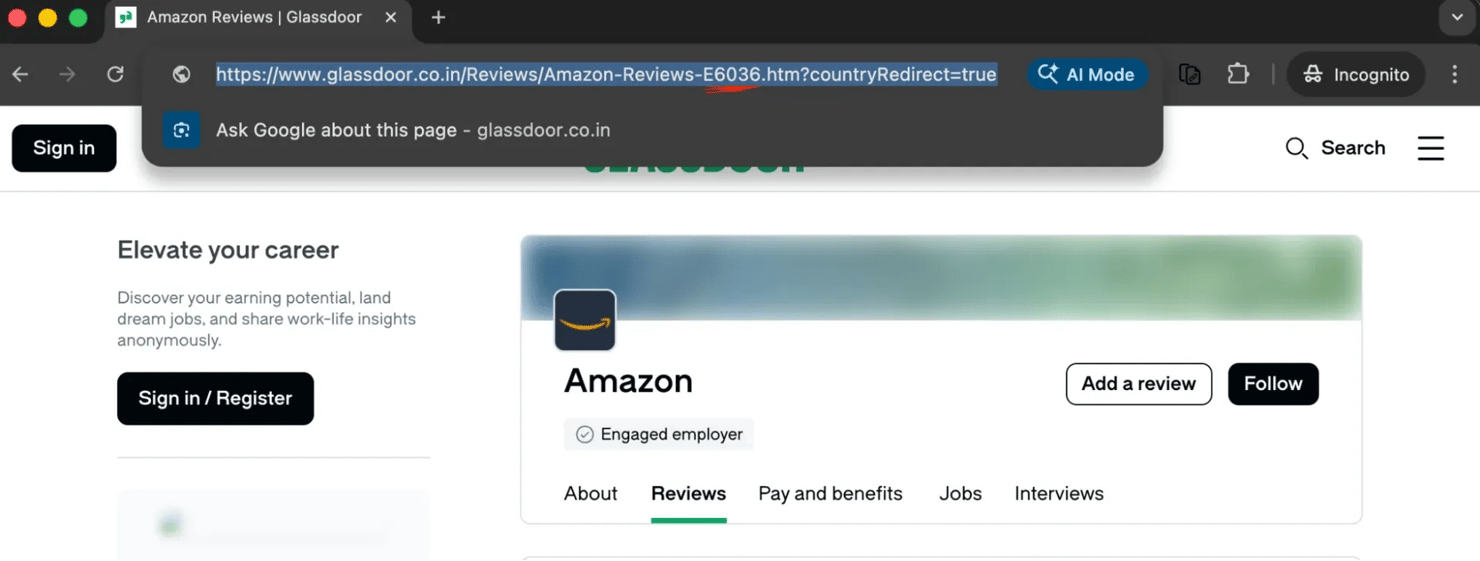
The ID appears in every Glassdoor URL type:
You don't need to parse these URLs manually because the typeahead API resolves company names to IDs programmatically.
Find company IDs
Glassdoor provides a typeahead/autocomplete endpoint that resolves company names to IDs:
The autocomplete dropdown shows employer matches with category labels:
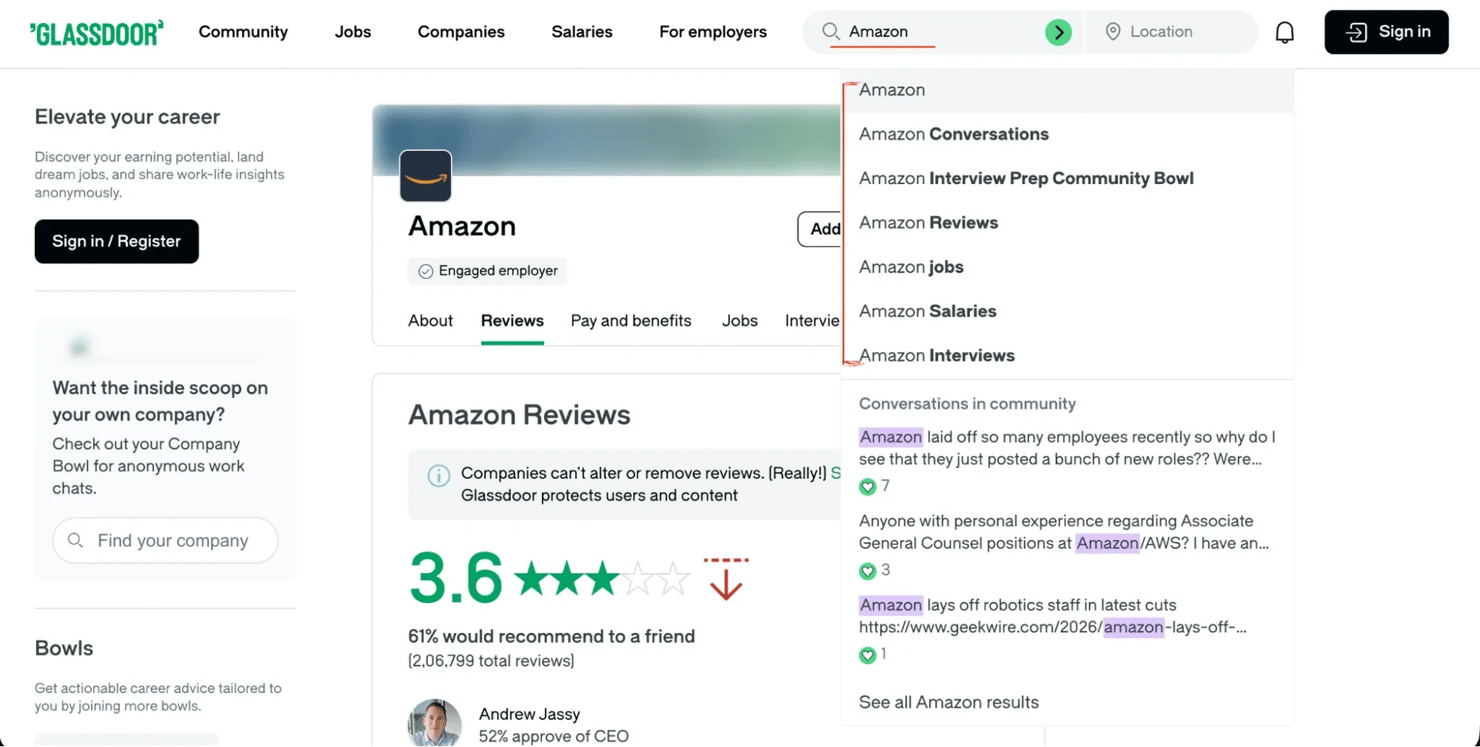
The typeahead endpoint is the same endpoint behind the autocomplete suggestions in the Glassdoor search bar. It returns structured JSON with employer IDs, names, and categories, so no HTML parsing is needed.
If the company name is ambiguous (for example, "Apple" matches both Apple Inc. and Apple Hospitality REIT), the scraper picks the first employer match. To target a specific company, pass --employer-id 6036 with the numeric ID from the Glassdoor URL.
Glassdoor internal API endpoints
The approach in this guide is different from all other Glassdoor scraping tutorials. Other tutorials scrape dynamic content by rendering pages and parsing HTML with Beautiful Soup. The scrapers here call the same API endpoints that the Glassdoor React frontend uses.
Open your browser DevTools (F12), go to a Glassdoor reviews page, and watch the Network tab. You'll see POST requests to URLs like the following:
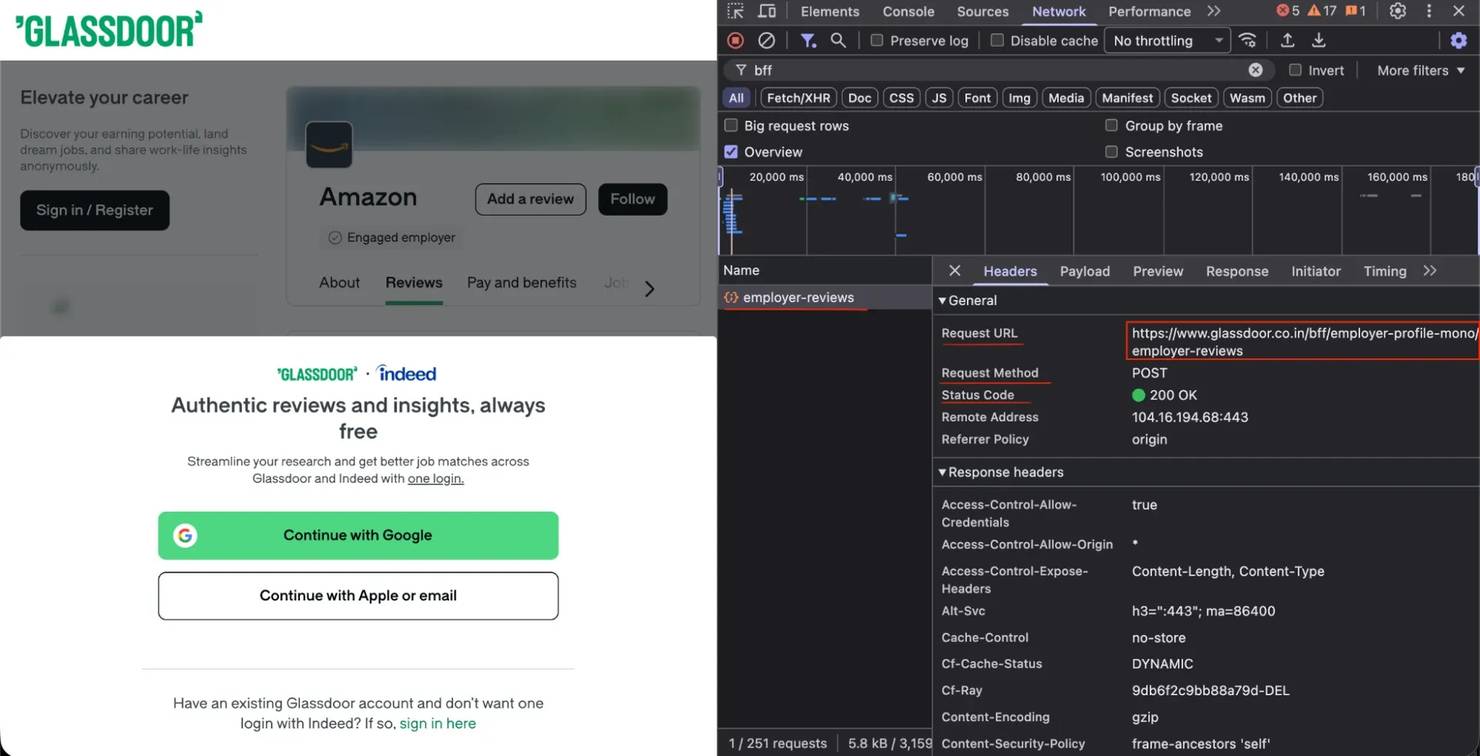
The BFF endpoints follow a consistent naming pattern:
The Preview tab shows the structured JSON that comes back from each endpoint:
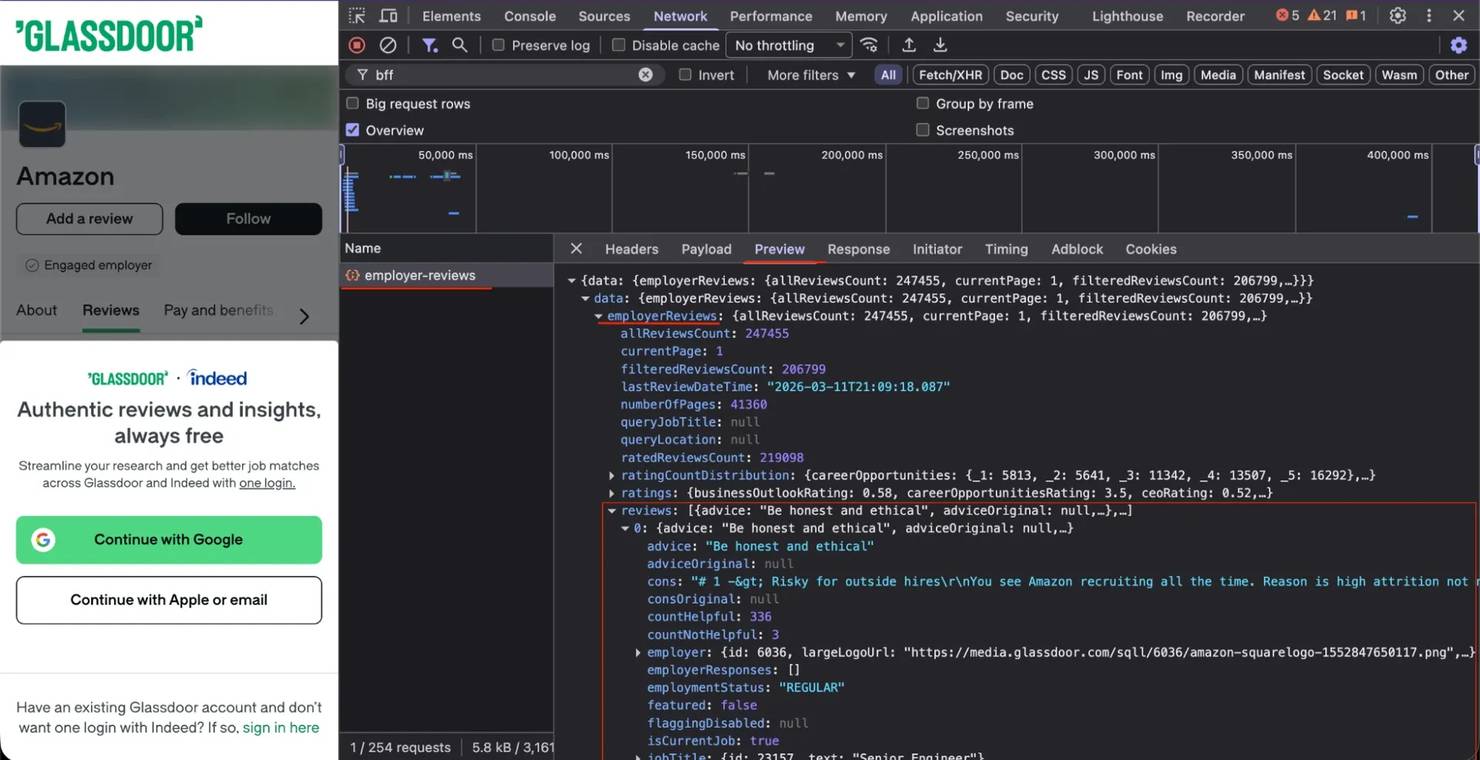
These BFF endpoints accept JSON payloads and return structured JSON responses:
- Structured data. No need to parse nested HTML elements or maintain CSS selectors that break when Glassdoor updates the frontend.
- Complete data. The API response includes fields that may not be visible on the rendered page.
- Faster execution. No browser rendering overhead. Each request takes milliseconds, not seconds.
- More stable selectors. Glassdoor changes API contracts less frequently than frontend markup.
Bypass Cloudflare: TLS fingerprint impersonation
Cloudflare checks the TLS fingerprint of every incoming connection and rejects anything that doesn't match a known browser.
Why standard HTTP libraries fail
When you make a request with Requests or httpx, your TLS ClientHello message doesn't match a real browser's. Cloudflare checks the following:
- Cipher suites and their ordering
- TLS extensions and their ordering
- ALPN (Application-Layer Protocol Negotiation) protocols (HTTP/2 support)
- Supported groups (elliptic curves)
- Signature algorithms
A mismatch on any of these results in a 403, a Cloudflare error 1010, or a JavaScript challenge page.
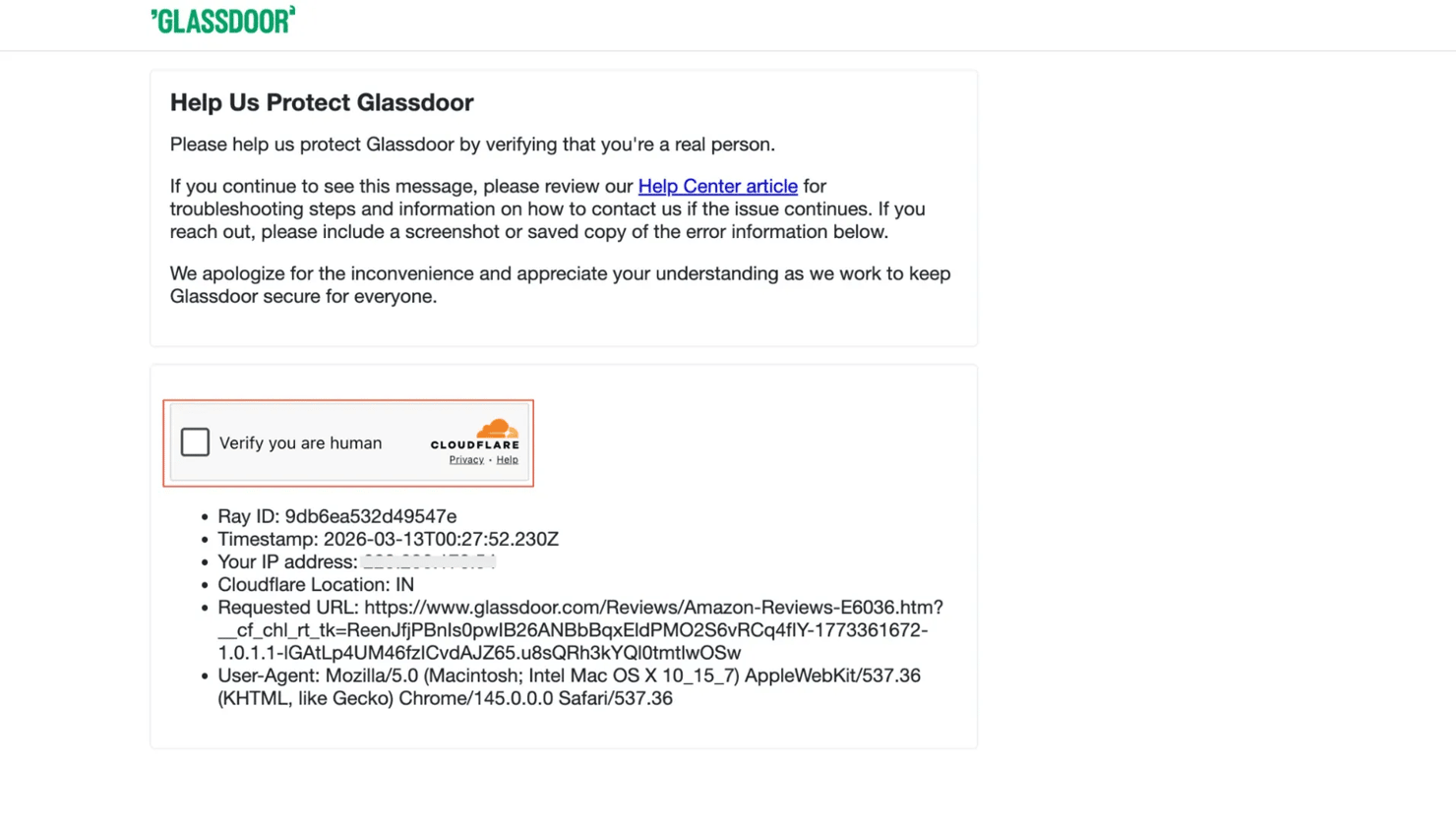
curl_cffi: browser-grade TLS without a browser
curl_cffi supports multiple browser impersonation versions, but not every version works. Cloudflare maintains a whitelist of known-good fingerprints:
The specific version matters. Testing multiple browser fingerprints showed that only chrome136 currently passes the Glassdoor Cloudflare. The working version will change over time as Cloudflare updates its fingerprint database.
A future curl_cffi release could rename or drop the chrome136 impersonation target, so pin your curl_cffi version in requirements.txt (for example, curl_cffi==0.7.4).
If you start getting 403s on every request, change BROWSER_VERSION in the scraper file. Test a few nearby Chrome versions (for example, chrome134, chrome138, chrome140). Run with --debug to see the raw status codes. The version closest to the current stable Chrome release usually works.
Advanced fingerprint tuning
Beyond the base browser version, real Chrome has TLS behaviors that curl_cffi doesn't enable by default. Without these settings, Cloudflare can detect that the fingerprint is incomplete. Add the following settings to close the gap:
Each setting matches a real Chrome behavior. If you skip any of these 4 settings, the fingerprint will have missing features that Cloudflare can detect.
Create the session
The session object holds the browser version, extra headers, and all fingerprint settings from the previous section:
The default_headers=True flag tells curl_cffi to generate all browser headers automatically, ensuring they match the impersonated version.
The 3-phase scraping pattern
Every scraper follows a 3-phase pattern.
Phase 1: bootstrap with sticky proxy
The first request goes to the Glassdoor homepage to establish cookies. A sticky proxy is required because session cookies are tied to the originating IP:
The bootstrap function loads the homepage, validates that session cookies were set, and extracts a CSRF (Cross-Site Request Forgery) token. Here's the core logic:
Some BFF endpoints optionally accept the CSRF token as gdToken in the request payload. In testing, the endpoints returned data without the CSRF token, but the scrapers include the token when available for reliability.
If the homepage returns a Cloudflare challenge (which happens sometimes), the scraper proceeds anyway. The BFF API endpoints often return data regardless of whether the homepage was blocked.
Phase 2: switch to API headers
Before making API calls, switch from browser navigation headers to XMLHttpRequest (XHR)/fetch headers. Many scrapers skip this step, which causes Cloudflare to block their requests:
The key takeaway: sec-fetch-mode: cors gets through Cloudflare, while sec-fetch-mode: navigate gets blocked. Real Chrome browsers use navigate for page loads and cors for JavaScript API calls. Cloudflare applies stricter protection to navigate requests and lighter protection to cors requests. The header switch matches what a real browser does when making an API call.
Phase 3: switch to rotating proxy and scrape
For data collection, switch to a rotating proxy that assigns a new IP per request. Rotating IPs distribute your requests across many addresses, avoiding per-IP rate limits:
Now the session is ready to make paginated API calls.
Bypass Glassdoor login popups and overlays
Glassdoor shows a login/signup overlay after a few page views. Browser-based scrapers need JavaScript injection or modal dismissal to bypass it.
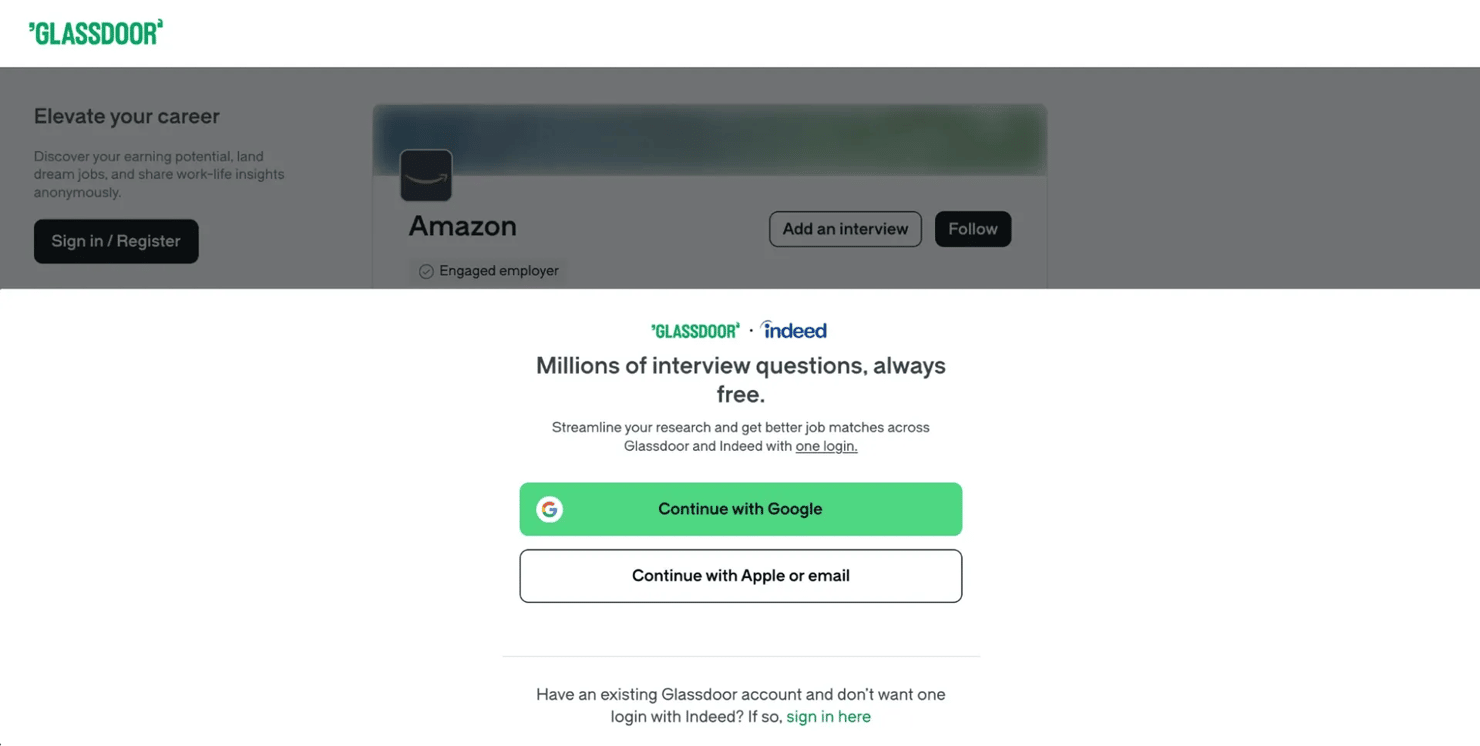
The BFF API approach avoids the overlay entirely because no web page is rendered. The API returns full data without authentication for publicly accessible content. This approach bypasses several common anti-bot systems that detect mouse movements, JavaScript execution, and DOM rendering. Direct API calls don't involve any of these.
Two Glassdoor-specific behaviors are important to understand:
Region selection
Glassdoor serves different content based on user region. Each regional site maps to a numeric TLD (top-level domain) ID that you pass in API payloads:
When scraping the Indian site (glassdoor.co.in), use tldId: 115 in your API payload and route requests through an Indian proxy (country="in") for consistent results.
The gdId cookie
The essential cookie is gdId, the Glassdoor persistent session identifier. If gdId is missing, some API endpoints may return incomplete data or redirect to a login page.
Scrape different types of Glassdoor data
Each scraper targets a different BFF endpoint but follows the same session flow: bootstrap, switch headers, collect data.
Scrape employee reviews
The following screenshot shows a typical Amazon review page on Glassdoor, including the star rating, sentiment fields, and pros/cons layout.
![Glassdoor review panel displaying '3.0 ★★★ Description Software development engineer [sde]' for Amazon on review page](https://decodo.com/cdn-cgi/image/width=1480,quality=70,format=auto/https://images.decodo.com/How_to_Scrape_Glassdoor_7_png_3cf534fa09/How_to_Scrape_Glassdoor_7_png_3cf534fa09.webp)
The reviews API returns the most detailed data. Each review contains an overall rating plus 6 sub-ratings, employment status, recommendation sentiment, CEO approval, and business outlook.
API Endpoint: POST /bff/employer-profile-mono/employer-reviews
The request payload includes filtering and pagination options:
The API supports filtering by employment status, current employees only, minimum rating, and text search. All filtering is through the JSON payload; no URL manipulation is needed.
The pageSize field controls how many records the API returns per page. The --pages CLI argument controls how many pages to fetch. For example, --pages 5 with the default pageSize of 10 returns up to 50 reviews. For large-scale collection, --pages 500 would fetch up to 5,000 reviews. The API doesn't enforce a hard page cap.
The response parser maps each API record to a dataclass with 21 fields:
The sentiment fields (recommend, ceo_approval, business_outlook) are returned as enum strings from the API ("POSITIVE", "APPROVE"). The parser maps values like "POSITIVE" and "APPROVE" to readable labels like "Yes" and "Approve".
Real output from an Amazon employee review:
21 fields per review. Sub-ratings (work_life_balance, culture_values, and others) are optional. Not every reviewer completes them, so expect empty strings in some records.
Scrape job listings
Job search results on Glassdoor include salary estimates, company ratings, posting dates, and filter options.
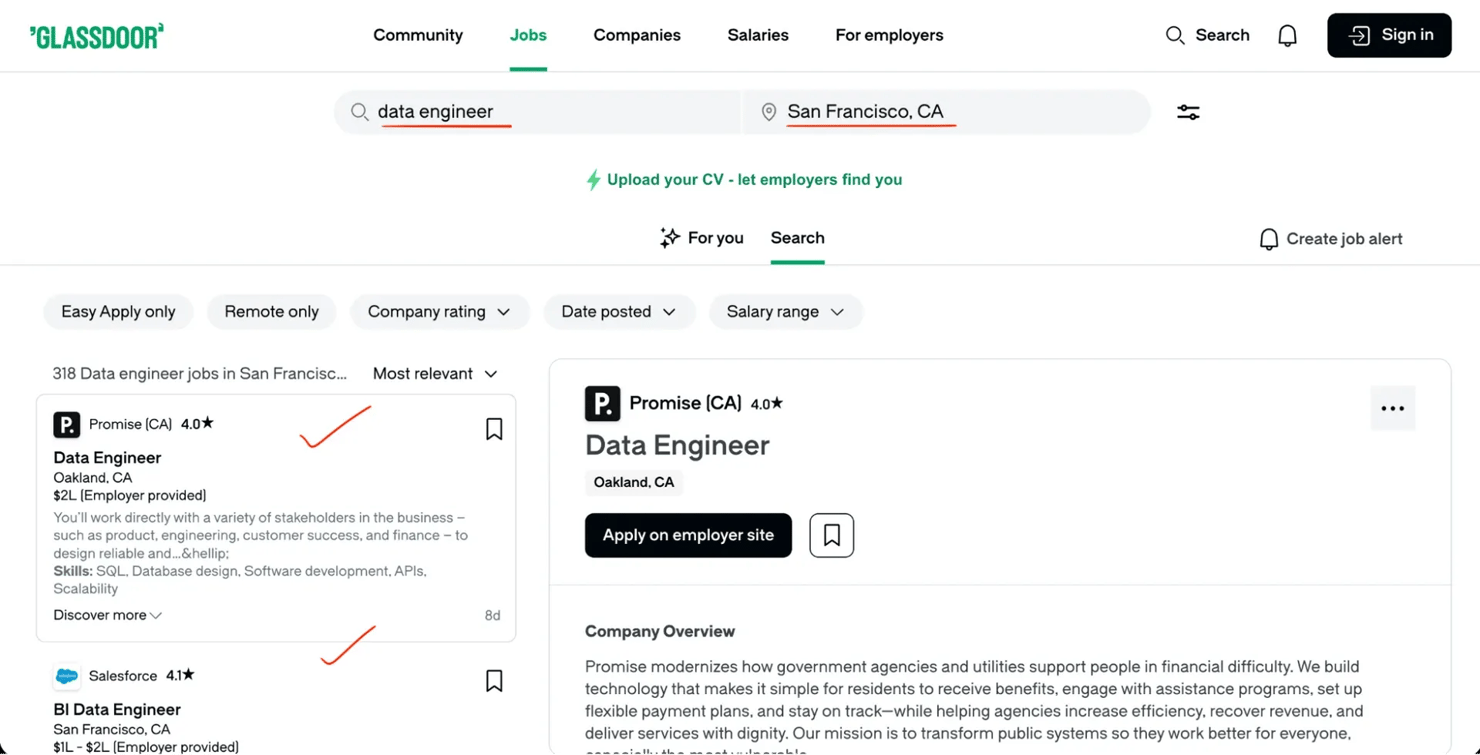
Unlike the reviews API, the jobs API requires you to convert a city name to a numeric location ID before making requests.
API Endpoint: POST /job-search-next/bff/jobSearchResultsQuery
Location resolution (converting a city name to a numeric ID) is needed first. The API requires a numeric location ID, not a city name:
The request payload uses filterParams for search criteria:
The pageCursor value for page 2 and beyond comes from the API response of the previous page. The cursor-based pagination section explains how to extract and chain cursor values.
The jobs API supports detailed filtering: sort order, remote/on-site, company rating, salary range, posting date, and Easy Apply. All filters pass through filterParams in the JSON payload.
The job parser extracts 12 fields per listing:
Note: the description_snippet field contains 140-160 character search fragments with keyword highlights, not full job descriptions. Retrieving full descriptions requires rendering individual job detail pages with a headless browser or a scraping API that handles JavaScript rendering.
The API returns ageInDays (how many days ago the job was posted) rather than an absolute date. Convert it as follows:
The ageInDays conversion gives you a consistent YYYY-MM-DD date format for all job records.
Scrape interview questions and experiences
Interview data has a different API endpoint and field structure, so most scraping tutorials don't cover it. The Glassdoor interview API returns difficulty ratings, candidate experience, offer outcomes, process descriptions, and actual interview questions asked.
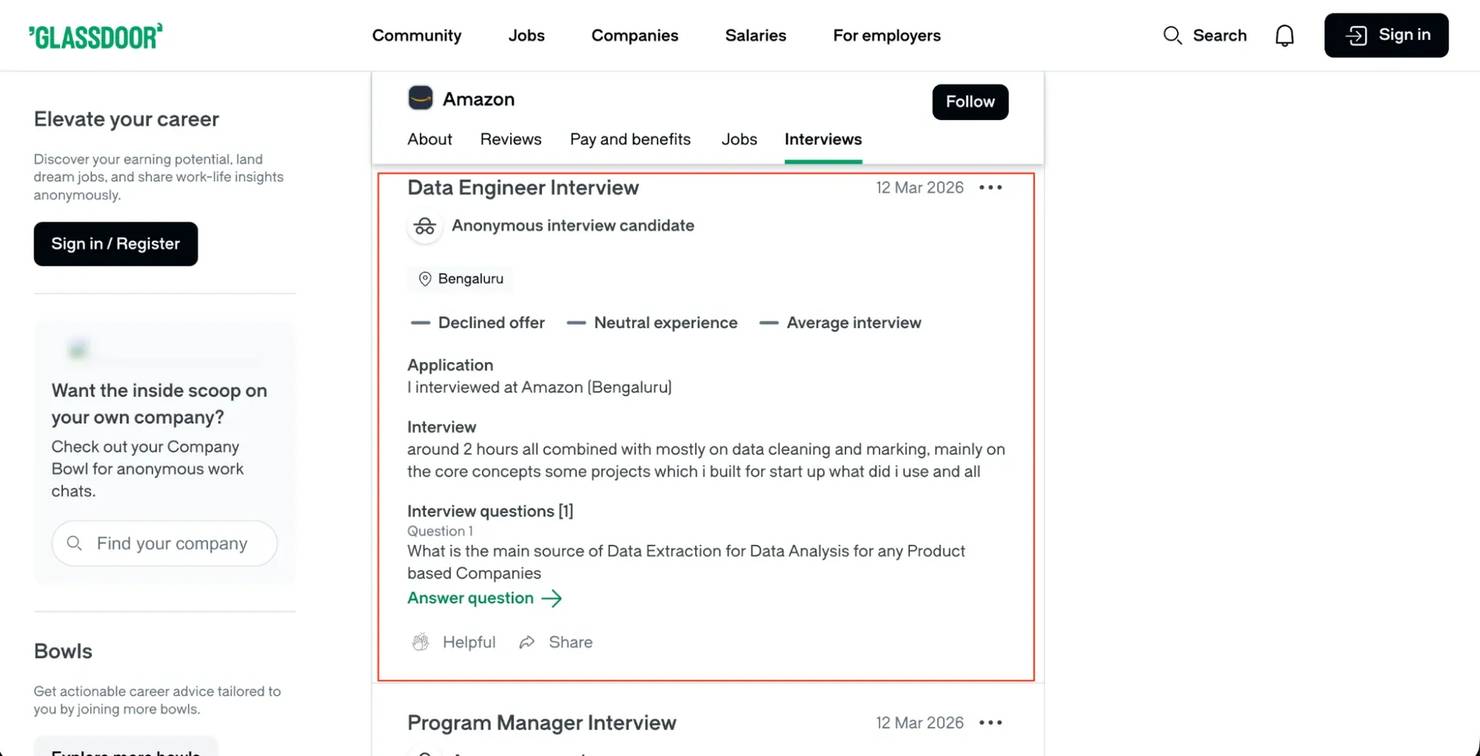
API Endpoint: POST /bff/employer-profile-mono/employer-interviews
The request payload differs from reviews in field naming:
Note: the interviews API uses itemsPerPage (not pageSize like reviews) and requires tldId (top-level domain ID, identifying the regional Glassdoor site). Because of these differences, test each endpoint separately. Don't assume that field names or pagination parameters are the same across endpoints.
The interview parser extracts 11 fields per record:
The questions field is particularly valuable. Each interview can include multiple questions, which the parser joins with pipe separators:
The output looks like: "Tell me about a time you disagreed with a manager | How would you design a URL shortener | Why Amazon?"
The obtained_via field shows how candidates found the company (online application, recruiter, employee referral). Combined with difficulty ratings and offer outcomes, this data shows hiring trends that job listings don't include. Most companies have "Average" difficulty, so companies rated "Easy" or "Difficult" are worth investigating.
Scrape company profiles
The company profile scraper extracts overview data for any employer: size, industry, headquarters, rating breakdowns, CEO approval, and business outlook. Unlike the other scrapers, this one doesn't need pagination. It makes 2 API calls per company and combines the results.
API Endpoints: The profile data is split across 2 BFF endpoints:
Both endpoints accept the same payload structure:
The company parser merges data from both endpoints into 19 fields:
One important parsing detail: CEO approval and business outlook are returned as 0-1 decimals from the ratings endpoint, not on the 1-5 scale or as percentages. A ceoRating of 0.52 means 52% CEO approval:
Real output from the Amazon company profile:
The result: 19 fields from 2 API calls, no browser, no HTML parsing.
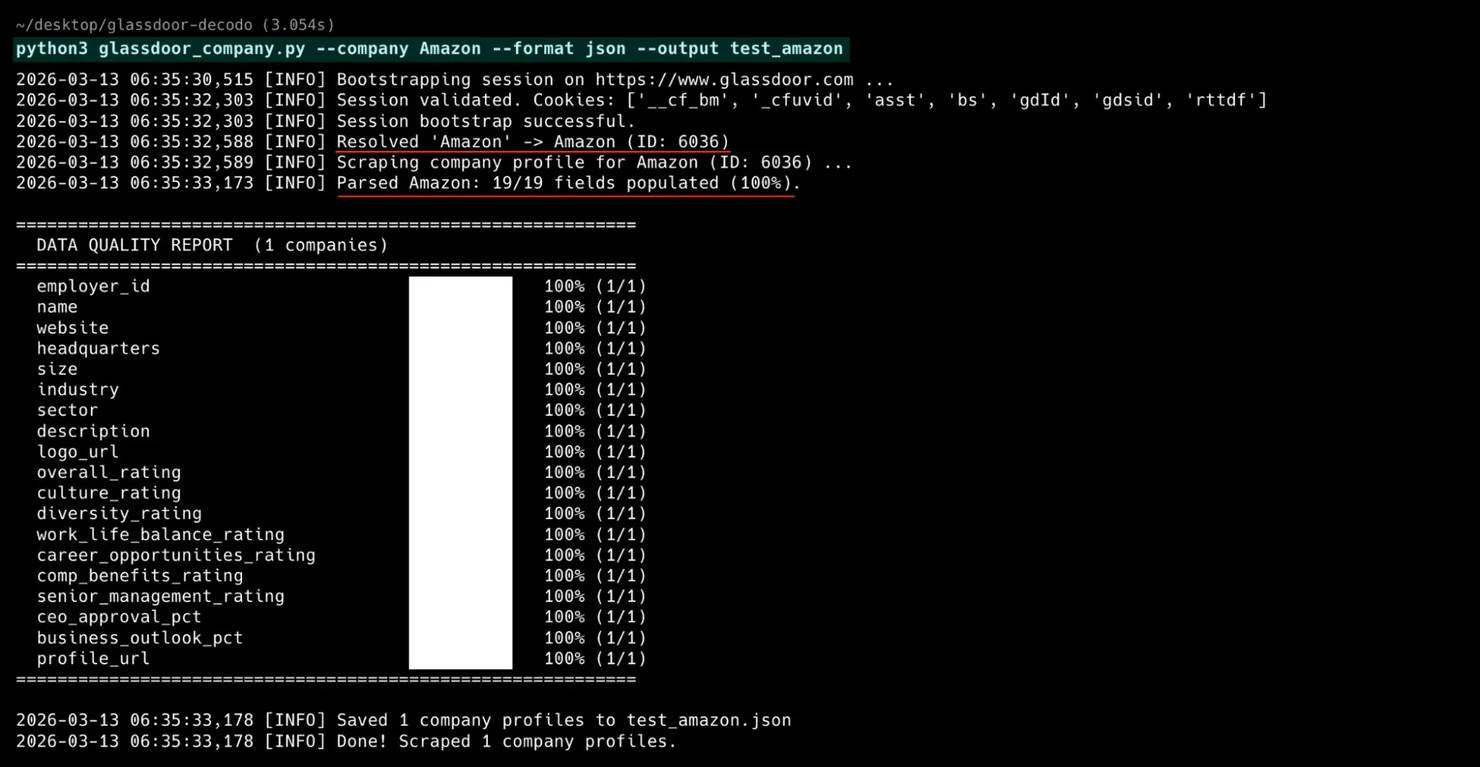
The company profile scraper also supports a --dump-raw flag that saves the raw API responses to JSON files. Use it for discovering new fields or debugging data quality issues.
Handle pagination and multi-page scraping
The reviews, jobs, and interviews scrapers handle pagination through the API payload. The company profile scraper doesn't need pagination – it's 2 API calls per company. No URL manipulation or "Next" button clicking is needed.
Page-number pagination (reviews and interviews)
The API payload includes a page field that increments with each request:
When the API returns fewer results than the requested page size, you've reached the last page and the loop stops.
Cursor-based pagination (jobs)
Instead of page numbers, the jobs API returns a cursor string in each response that points to the next batch:
When the paginationCursors array is empty or the last cursor has no value, pagination is complete. The page-number and cursor-based pagination examples both include seen_ids deduplication, which prevents duplicate records when the API returns overlapping results between pages.
Bypass Glassdoor anti-scraping techniques
Beyond TLS fingerprinting, the scrapers use 4 techniques to avoid detection and recover from blocks.
Cloudflare challenge detection
When Cloudflare blocks a request, it returns a challenge page instead of data. Detect the block by checking for known markers:
The is_challenge_page function checks both the cf-mitigated header and the response body for Cloudflare-specific strings.
Retry with exponential backoff
The safe_request wrapper catches 403/429/503 responses and retries with exponential wait times (5s, 10s, 20s):
The random jitter (small random addition to each delay) avoids predictable retry patterns that anti-bot systems detect. The retry logic catches Cloudflare challenges (status 403/429/503). The complete scrapers also retry on transient server errors (500, 502) and connection timeouts, which happen occasionally with residential proxies.
Request timing
Randomized delays (3-5 seconds between pages) are essential. Fixed delays (exactly 3.0s every time) create a detectable pattern. The scrapers use random.uniform() to vary each pause.
With residential proxies and 3-5 second delays, expect roughly 100-150 pages per hour. When scraping multiple companies in one run, add 5-10 seconds between companies to prevent the anti-bot system from detecting a pattern across your session.
Handle CAPTCHAs
CAPTCHAs are rare with the BFF API approach because cors requests receive lighter Cloudflare protection than page loads.
If Cloudflare switches from TLS challenges to CAPTCHAs, rotate to a new proxy IP and retry. The rotating proxy setup handles this automatically since each request gets a different IP. For persistent issues, increase delays to 8-15 seconds. For proxy rotation and CAPTCHA-solving techniques that apply across providers, read the Google CAPTCHA bypass guide.
Save scraped data to JSON and CSV
Both formats are useful for different purposes. The scrapers support CSV, JSON, or both via the --format flag.
JSON output
JSON preserves data structure and handles nested fields naturally:
The ensure_ascii=False flag is important when collecting data from international Glassdoor sites. Without it, Python escapes non-ASCII characters to \uXXXX sequences. Company names and reviews often contain accented letters and non-Latin characters that should stay readable in the output.
CSV output
CSV is ideal for spreadsheet analysis and database imports:
The Python csv module handles quoting and escaping automatically. Review text with commas, quotes, and newlines is escaped and quoted correctly.
For more on how to save scraped data including database storage options, read the dedicated guide. For post-processing workflows, read the guide on what is data cleaning.
Full scraper source code
Each scraper is a single standalone Python file with all anti-detection, session management, and proxy code inlined. The only external dependency is curl_cffi.
Scraper
Fields
Gist
Download any file and run it with python <scraper>.py --help to see all options.
Run the scrapers: complete CLI examples
All 4 scrapers support --help to see every available flag and option (for example, python glassdoor_reviews.py --help).
Reviews scraper
Supports filtering by rating, employment status, and keyword search:
Run with --debug to see full request and response details for troubleshooting.
Jobs scraper
Filters by location, work type, posting date, salary, and Easy Apply status:
All filters combine, so --easy-apply --min-salary 120000 --work-type remote narrows results to remote Easy Apply jobs with salaries above $120,000.
Interviews scraper
Collects interview questions, difficulty ratings, and offer outcomes:
Interview data includes difficulty ratings, offer outcomes, and the questions asked, so use --format json to preserve the nested question arrays.
Company profile scraper
Extracts ratings, headquarters, industry, and management sentiment:
Use --dump-raw during development to save the full API response alongside the parsed output.
Batch mode
All 4 scrapers support batch mode with CSV input.
The companies CSV file defines which employers to scrape:
The searches CSV file defines job queries:
Each batch run processes all rows sequentially, adding a 5-10 second delay between companies to avoid triggering rate limits. If a company in the batch fails (bad name, Cloudflare block), the scraper logs the error and moves to the next row. Batch mode creates one output file per company (for example, Amazon_reviews.json, Google_reviews.json).
Troubleshoot common scraping issues
When the scrapers don't behave as expected, use this table to diagnose the problem. For proxy-specific issues, see the full proxy error codes reference.
Problem
Cause
Fix
403 on every request
TLS fingerprint rejected by Cloudflare
Update the curl_cffi impersonation version. Try chrome134, chrome138, or a newer release.
Empty JSON or missing fields
BFF API field names changed
Run with --debug to inspect the raw API response. Check field names in the JSON against the parser.
HTML response instead of JSON
Silent Cloudflare block (200 OK with challenge page)
Check the Content-Type header. Rotate to a new proxy IP and retry.
429 rate limiting on most requests
No proxies or same IP used for too many requests
The scraper retries automatically, but collection is slow. Add residential proxies with --proxy-user and --proxy-pass to avoid retries. Datacenter IPs don't work.
"Company not found" error
Typeahead API didn't match the name
Use the exact company name from the Glassdoor URL, or pass --employer-id with the numeric ID directly.
CAPTCHA challenges on every request
IP reputation is too low
Switch to a different proxy region with --country. Increase delays between requests.
Script hangs during bootstrap
Homepage request timed out
Check your network connection. The scraper retries 3 times automatically. If all attempts fail, try a different proxy.
Run any scraper with --debug to see the full request/response cycle, including headers, status codes, and response body previews.
When to use a scraping API instead of a custom scraper
Building and maintaining custom scrapers takes ongoing work. The code in this guide works today. But Glassdoor can change the API structure, Cloudflare can update its fingerprint database, or chrome136 can stop working. If maintaining scrapers isn't your core work, a managed solution handles these changes for you.
When to consider a managed solution
- Large-scale collection. Scraping thousands of companies daily requires infrastructure beyond a single script.
- Ongoing scheduled refreshes. Maintaining scrapers through API changes takes ongoing engineering time.
- Limited engineering resources. Not every team has developers who can debug TLS fingerprint issues.
- Reliability requirements. When data freshness is business-critical, managed solutions offer better uptime guarantees.
If two or more of these apply, evaluate a managed scraping service before investing further in custom code.
The Decodo scraping infrastructure
If you'd rather skip the maintenance overhead, Decodo offers several products that complement or replace custom scrapers:
- Web Scraping API. Handles JavaScript rendering, proxy rotation, and anti-bot bypass automatically. Send a URL, get data back as HTML, JSON, CSV, or Markdown. The API uses per-request pricing – you configure proxy strength and rendering per request, so costs scale with actual complexity.
- Site Unblocker. For accessing heavily protected sites like Glassdoor without managing proxy rotation manually. Site Unblocker handles fingerprinting and challenges automatically on the proxy server.
- Residential proxies. For integrating high-quality rotating IPs into your own scraper. The residential proxy approach is what this guide uses throughout.
For comparison, here's what Glassdoor scraping looks like with the Web Scraping API vs. the custom approach in this guide:
The API supports additional parameters like geo, device_type, and markdown. The example uses proxy_pool: "premium" for Cloudflare-protected sites like Glassdoor.
The trade-off is clear. The API handles Cloudflare bypass, proxy rotation, and rendering in one call. But it returns HTML that you still need to parse. The custom BFF approach in this guide gives you structured JSON directly (no parsing), but you own the maintenance.
Which approach fits your situation?
- Use the custom BFF scrapers if you need structured JSON and full control over field parsing. Cost is proxy bandwidth only.
- Use the Web Scraping API if you want zero maintenance or need to scrape multiple sites beyond Glassdoor. No TLS fingerprint debugging required.
- Start with the custom approach, switch later if you're unsure. The custom scrapers work today with minimal cost. If maintenance becomes a burden, the API is a direct replacement for the network layer.
For a broader comparison of options, read the guide on best web scraping services. For complementary job data, read about the Indeed Scraper API.
Common Glassdoor API issues and data problems
These findings come from collecting hundreds of records across multiple companies (Amazon, Google, Microsoft, Infosys) and auditing every field.
API field names don't match what you'd expect
The Glassdoor BFF APIs use field names that don't match what you'd expect from the frontend. Sometimes 2 endpoints use 2 different names for the same data.
Interview dates: The expected field was interviewDateTime, but the field was empty for every record. The actual data is in reviewDateTime (yes, reviewDateTime for interview data). The scraper checks each field name until it finds a non-empty value:
Interview questions: Same pattern. The expected field interviewQuestions was empty. The actual field is userQuestions:
How the interview was obtained: The expected field was interviewObtainedChannel. The API uses source:
Job descriptions: The API doesn't return a full description field. Instead, it returns descriptionFragmentsText, an array of short search snippets (140-160 characters) that you need to join:
So, the simple lesson is never assume field names match what the frontend displays. Inspect actual API responses with --debug mode and print the raw JSON. This is the same approach used in scraping with curl. Field naming in BFF APIs is often inconsistent across endpoints and sometimes misleading.
Ghost fields: data that looks useful but is always empty
The data classes were initially defined based on what fields should exist logically. After scraping hundreds of records across multiple companies, several fields turned out to be consistently empty or useless.
- is_current_employee in interviews. Always returns True regardless of the actual employment status. Testing 100+ interview records across 2 companies showed all 100+ records returned True. The field is either an API bug or an intentional omission. Either way, the data is unreliable. The scraper removes the field entirely instead of outputting misleading data.
- advice in interviews. The field exists in the API response schema but returns content in 0 out of 100 records tested. Unlike reviews (which have a reliable adviceToManagement field), interview advice is always empty. The scraper removes this field.
- benefits in job listings. The API schema includes a benefits field, but it never contains data in search results. Benefits data may exist on individual job detail pages, but the search results BFF endpoint doesn't populate it. The scraper removes this field instead of including columns of empty strings.
- duration_days in interviews. The field showed how long the interview process took. The field sounds useful. In practice, it was populated in only 5% of records across multiple companies. Almost a ghost field. The scraper removes this field because a column that's 95% empty adds noise, not signal.
- 6 fields missing from company profiles. The company profile BFF endpoints don't return CEO name, revenue, founded year, company type, total review count, or recommend-to-friend percentage. All 6 were in the initial dataclass and all 6 returned empty for every company tested. The Glassdoor frontend renders these 6 fields on the company page. The data comes from a different source – likely server-side rendered, not from the BFF API.
Always validate your data with real output before considering a scraper "done". Run it against 2-3 different companies and audit every field. A field that exists in the API response isn't the same as a field that contains data.
All 4 scrapers include a built-in data quality report that runs after every scrape. It shows per-field population percentages and flags ghost fields (0% populated) and sparse fields.
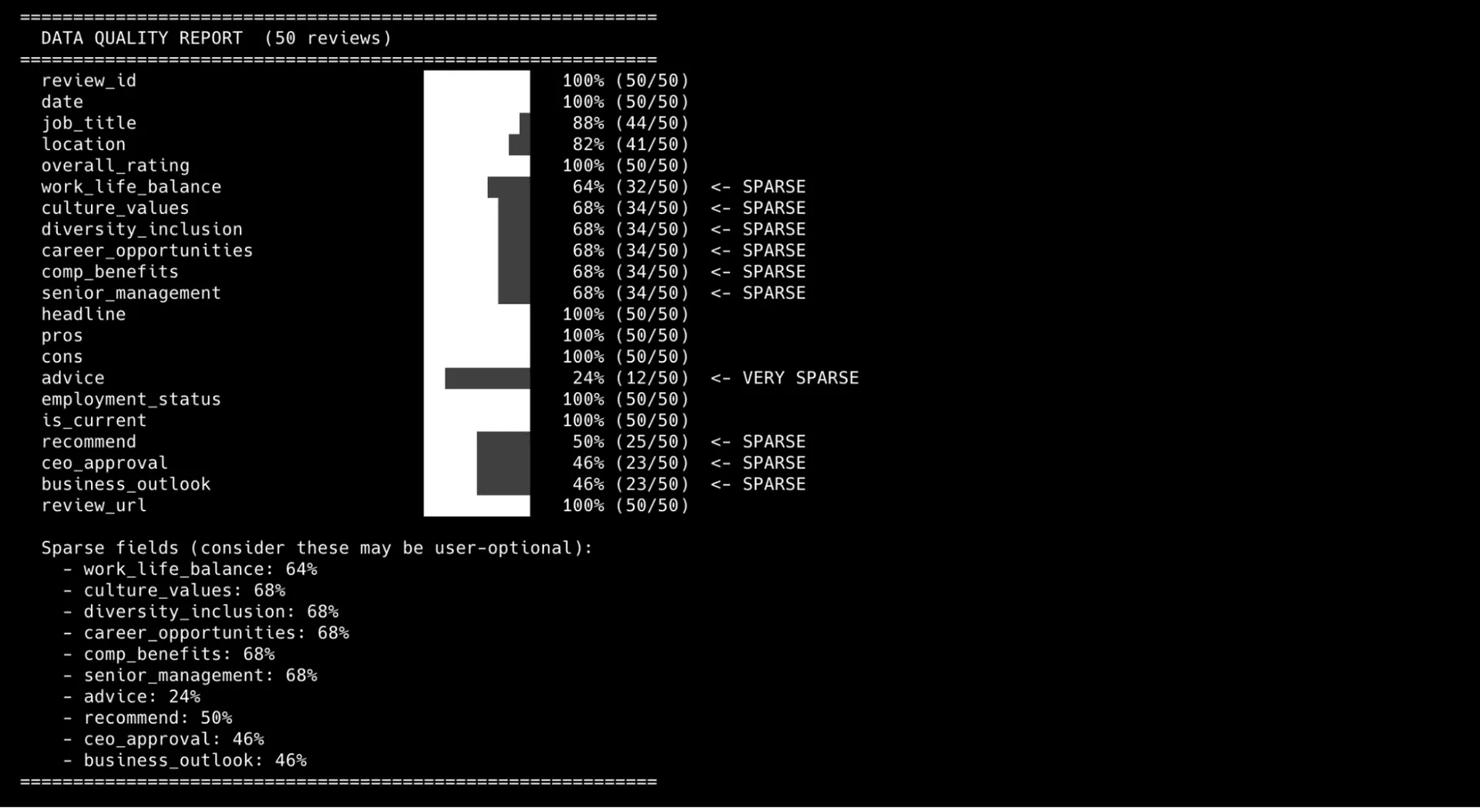
The report makes hidden data quality issues visible. Sparse fields (like sub-ratings and advice in reviews) are part of the Glassdoor source data – user-optional fields that many reviewers skip.
Data coverage drops sharply for smaller companies
Testing against big tech companies (Amazon, Google, Microsoft, Apple) showed 100% field population across all 19 company profile fields. That result was misleading because smaller companies have significant gaps.
Testing against smaller companies showed different results:
Company
Fields Populated
Fill Rate
Amazon
19/19
100%
19/19
100%
BaseCamp
14/19
74%
Doodle HR
15/19
79%
The missing fields for smaller companies: industry, sector, description, CEO approval, and business outlook. Glassdoor populates these fields only after a company accumulates roughly 50+ reviews and contributions.
So, never benchmark your scraper against Fortune 500 companies alone. Test against at least one company with fewer than 500 employees. The API response shape is identical, but half the fields may be empty. If your downstream pipeline expects non-null values, it will fail for smaller companies.
CEO approval and business outlook use a different scale
The company ratings endpoint returns 7 ratings on a 1.0-5.0 scale (overall, culture, diversity, work-life balance, career opportunities, compensation, senior management). But CEO approval and business outlook use a completely different 0-1 decimal scale.
A ceoRating of 0.78 means 78% CEO approval, not a 0.78/5.0 rating. If you treat it like the other ratings, you'd report "CEO rating: 0.8 out of 5" instead of "78% approval". The scraper converts these to percentages:
2 different scales in the same API response, without any documentation. The only way to discover this is to compare the raw values against what the Glassdoor frontend displays.
Boolean fields that lose information
The first version of the reviews scraper stored recommend, ceo_approval, and business_outlook as booleans. A code review found that booleans lose important distinctions. Booleans can't distinguish "Disapprove" from "No Opinion" for CEO approval, or "Negative" from "Neutral" for business outlook.
The API returns enum strings like "POSITIVE", "APPROVE", "NO_OPINION". Preserve the granularity:
The difference matters for analysis. "No Opinion" is a meaningful data point. It means the reviewer chose not to express a view, which is completely different from approval or disapproval.
Silent blocks: 200 OK with wrong content
Not all blocks are obvious 403s. Sometimes Cloudflare serves a challenge page with a 200 status code instead of a 403. The request looks successful, but the response body contains HTML instead of JSON.
Catch the silent block by checking the Content-Type header before parsing:
Without the Content-Type check, you'd try to parse a Cloudflare challenge page as JSON. The result is an unclear JSONDecodeError with no indication of what went wrong. In the complete scrapers, validate_json_response runs after every API request. validate_json_response works alongside is_challenge_page in safe_request. The division is clear: safe_request handles overt blocks (403/429/503). validate_json_response catches silent blocks (200 with HTML) during response parsing.
The homepage can fail but the API still works
The most surprising finding: the session bootstrap sometimes gets a full Cloudflare challenge page (403 with JavaScript challenge). You'd expect the entire scraping session to fail.
But the session doesn't fail. The BFF API endpoints often work regardless of whether the homepage loaded successfully. Cloudflare treats page navigations (sec-fetch-mode: navigate) and API calls (sec-fetch-mode: cors) as separate protection contexts. The homepage can be blocked while the API is open.
The scrapers use this by making bootstrap optional (try it, but continue if it fails):
Most scraping tutorials treat a blocked homepage as a session failure and retry or abort. In practice, skipping the failed bootstrap and calling the API directly usually works.
Company profile data is split across 2 endpoints
No single "company overview" endpoint exists. The company profile data is split across 2 separate BFF endpoints that return different slices:
- employer-data – returns company info: name, headquarters, size, industry, sector, description, logo
- employer-ratings – returns the full ratings breakdown: 7 ratings + CEO approval + business outlook
Neither endpoint alone returns all the data. The employer-data response includes a partial ratings object (only overallRating), which makes it look like no other ratings exist. If you only call one endpoint, you'd miss either the company metadata or the detailed rating breakdown.
The scraper calls both endpoints and merges the results, with the employer-ratings response taking priority for rating fields. If the ratings endpoint fails (rare), it falls back to the partial ratings from employer-data.
Salary pages have stricter Cloudflare protection
Glassdoor applies different Cloudflare protection levels to different page types. Reviews, jobs, and interviews pass through with TLS fingerprint impersonation. Salary pages (/Salary/…) don't. They have stricter protection applied specifically to those URL paths, blocking even well-impersonated requests.
That's why the scraper suite covers reviews, jobs, interviews, and company profiles but not dedicated salary data. Job listings include salary estimates from the search results API. But detailed salary breakdowns require a different approach. Playwright with the stealth plugin is the most common option, though success rates vary as Cloudflare updates its detection.
Error handling: tracebacks that are often missed in testing
The first versions crashed with raw Python tracebacks on edge-case input:
- Invalid company name (--company "xxxxNotACompany") threw an unhandled ValueError from the typeahead API returning no results
- Missing batch file (--batch nonexistent.csv) threw a FileNotFoundError
These edge cases are often overlooked. They only appear when testing every CLI parameter combination:
Wrapping the main execution in structured exception handling turns raw tracebacks into actionable error messages.
Bottom line
The Glassdoor BFF APIs return cleaner, more complete data than HTML parsing. The curl_cffi library with chrome136 fingerprinting handles the Cloudflare layer, and Decodo residential proxies handle the IP rotation. The 4 scrapers in this guide cover reviews, jobs, interviews, and company profiles – all structured JSON, no browser required. Download any scraper, add your Decodo proxy credentials, and start collecting data.
About the author

Justinas Tamasevicius
Director of Engineering
Justinas Tamaševičius is Director of Engineering with over two decades of expertise in software development. What started as a self-taught passion during his school years has evolved into a distinguished career spanning backend engineering, system architecture, and infrastructure development.
Connect with Justinas via LinkedIn.
All information on Decodo Blog is provided on an as is basis and for informational purposes only. We make no representation and disclaim all liability with respect to your use of any information contained on Decodo Blog or any third-party websites that may belinked therein.