Web Scraping with Ruby: A Simple Step-by-Step Guide
Web scraping with Ruby might not be the first language that comes to mind for data extraction – Python usually steals the spotlight here. However, Ruby's elegant syntax and powerful gems make it surprisingly effective. This guide walks you through building Ruby scrapers from your first HTTP request to production-ready systems that handle JavaScript rendering, proxy rotation, and anti-bot measures. We'll cover essential tools like HTTParty and Nokogiri, show practical code examples, and teach you how to avoid blocks and scale safely.

Zilvinas Tamulis
Last updated: Dec 12, 2025
15 min read
Quick answer (TL;DR)
How Ruby scrapers work:
- Send HTTP requests to fetch HTML from web pages
- Parse the HTML document with Nokogiri to extract data
- Save scraped data to CSV, JSON, or your database
Essential Ruby gems:
- HTTParty – simple HTTP requests
- Nokogiri – HTML parsing and CSS selectors
- Mechanize – forms, sessions, and cookies
- Ferrum/Selenium – JavaScript-heavy sites requiring headless browsers
When to build your own vs. use an API:
- Build it yourself – good for learning, simple projects, complete control
- Use a scraping API – good for production scale, JavaScript rendering, proxy rotation, avoiding blocks, and saving development time
DIY scrapers are great for learning and basic tasks. For serious web scraping use cases at scale, tools like Decodo's Web Scraping API handle the infrastructure (proxies, CAPTCHAs, rendering), making the process much less of a headache when debugging at 2 AM.
What is web scraping with Ruby?
Ruby is a programming language created by Yukihiro Matsumoto in the mid-1990s with a focus on developer happiness and readable code. It's best known for powering Ruby on Rails, a robust web application framework, but it's also a solid choice for web scraping thanks to its clean syntax and mature ecosystem of gems (Ruby's term for libraries).
Web scraping is the process of using Ruby to extract data from web pages automatically. Instead of manually copying information from websites, you write a Ruby script that fetches HTML documents, cleans them, and pulls out the specific data you need. You can extract anything – product prices, article text, contact information, or other structured data on the web.
The basic workflow is straightforward: your Ruby script sends an HTTP request to a target website, receives the HTML response, parses that HTML document to locate specific elements using CSS selectors or XPath, extracts the desired data, and saves it in a usable format like CSV or JSON.
How Ruby web scrapers work step-by-step
Building a Ruby web scraper follows a simple pattern that becomes second nature once you've done it a few times. Here's what a typical scraping workflow looks like:
- Inspect the target webpage. Open your browser's developer tools and examine the HTML structure to identify which elements contain your desired data.
- Send an HTTP request. Use a Ruby gem to fetch the HTML document from the web page.
- Parse the HTML response. Load the HTML string into a parser that understands the document structure.
- Extract data. Use CSS selectors or XPath to select HTML elements and pull out text, attributes, or links.
- Clean and structure. Process the scraped data into a readable format, handling any inconsistencies or missing values.
- Save the data. Export to a CSV file, JSON, database, or wherever you need it.
Once you've built the scraping logic for one page, you can loop through multiple pages, add error handling for failed requests, and schedule your Ruby script to run automatically. The hard part is understanding the target website's structure – the actual Ruby code can range from just a few dozen lines to a few hundred, based on website complexity.
Core Ruby gems for web scraping
Ruby's ecosystem offers several excellent web scraping libraries, each suited for different scenarios. Here are the essential ones every Ruby web scraper should know.
HTTParty
HTTParty makes performing HTTP requests super easy. It's perfect for basic GET and POST requests when you just need to fetch HTML.
Use HTTParty when you need a lightweight HTTP client for straightforward requests without complex session handling.
Nokogiri
Nokogiri is the best choice for parsing HTML and XML documents in Ruby. It lets you navigate and extract data from HTML elements with ease, similar to Beautiful Soup in Python.
Use Nokogiri when you need to parse and extract data from HTML documents (which is basically always).
Mechanize
Mechanize combines HTTP requests with HTML parsing and adds session management, cookie handling, and the ability to submit forms. It's like a programmable browser without a GUI.
Use Mechanize when you need to interact with forms, handle cookies, or maintain sessions across multiple requests. It shouldn't be confused with a headless browser, as it cannot handle JavaScript-heavy pages where content is loaded dynamically.
These three gems cover most of the simple web scraping scenarios. Combine HTTParty or Mechanize for fetching pages with Nokogiri for parsing, and you've got everything you need to build a capable Ruby web scraper.
Set up your Ruby environment
If you're entirely new to Ruby, you'll need to install it on your machine. The easiest way to install Ruby depends on your operating system:
- macOS. Ruby comes pre-installed, but you'll want a newer version. Use Homebrew:
This will install Ruby, but it will be a "keg-only" version, since it will try to avoid conflict with the existing Ruby installation. To use the latest installed version, add its bin directory to your PATH:
Then reload your shell:
- Windows. Download the RubyInstaller and run it. Follow the setup instructions.
- Linux. Use your package manager:
After installation, verify your Ruby version by opening your terminal and running:
You should see something like Ruby 3.2.0 or higher. If you see it, you're good to go.
Choose your Ruby IDE
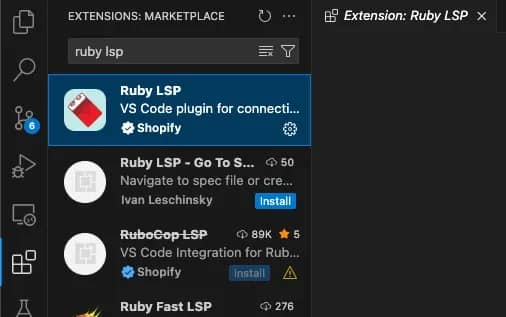
While you can write Ruby in any text editor, VS Code is a solid choice with excellent Ruby support. Install the "Ruby LSP" extension by Shopify for syntax highlighting and IntelliSense.
Run it from your terminal:
If you see a greeting and Ruby version printed, congratulations, you're ready to start scraping the web. Time to install some gems and make HTTP requests.
Build your first Ruby web scraper
Let's build a real web scraper. We'll scrape country information from a beginner-friendly practice site, extract some data, and save it to a CSV file. By the end of this section, you'll have a complete, functioning Ruby scraper you can modify for your own projects.
We're going to use Scrape This Site – a website specifically designed for learning web scraping.
Step 1: Inspect the page and define your data
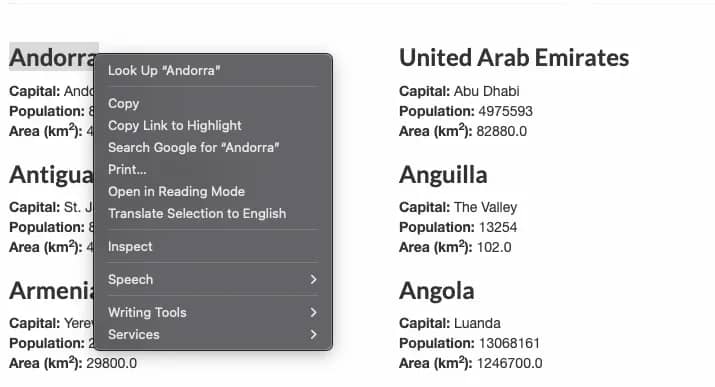
Before writing any code, you need to understand the structure of the target webpage. Open the practice page in your browser and right-click on a country name, then select Inspect or Inspect Element.
You'll see the HTML structure. Each country is wrapped in a <div class="country"> with child elements containing the data:
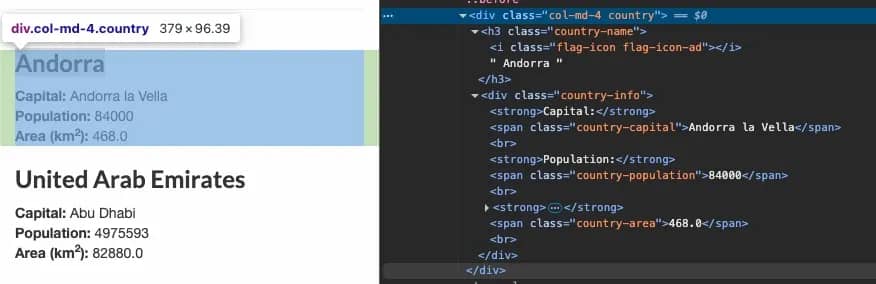
- Country name is in <h3 class="country-name">
- Capital is in <span class="country-capital">
- Population is in <span class="country-population">
- Area is in <span class="country-area">
Keep these in mind, as these elements contain the information you'll be scraping.
Step 2: Set up your project
First, create a project folder manually, or through a terminal command:
Install the gems you'll need. Create a Gemfile (a plain text file without any extension) in your Ruby project:
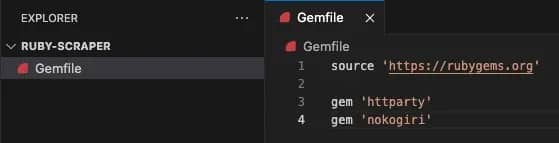
The source defines where to install the gems from. RubyGems is the leading choice, but it's possible to get them from alternate sources (such as internal company servers).
Then run the following command from your terminal to install all the gems:
You can also install the gems individually:
Step 3: Fetch HTML with Ruby
To get data from the website, create a file called scraper.rb and fetch the HTML:
Run it with:
If you see a lot of scary HTML printed, then don't fear – it's a sign of success, and you've just performed your first HTTP request.
Step 4: Parse HTML with Nokogiri
Now for the fun part – extracting the data. Use Nokogiri to parse the HTML and CSS selectors to pinpoint the elements you want.
Update your scraper.rb:
The .css() method uses CSS selectors to find HTML elements – .text extracts the text content, and .strip removes any extra whitespaces. Run the script, and you'll see the first 3 countries' data printed to your terminal:
If you want to see more than just the first 3 results, you can change the number in this line:
Step 4: Save and reuse your data
Printing to the terminal is great for testing, but if you try to print all 250 results, it won't even fit in most terminal windows. It's also not great for readability or analysis. Let's save the scraped data to a CSV file so you can actually do something useful with it.
Luckily, Ruby has a built-in CSV library, so no additional gems are needed. Update your Ruby script:
Run it, and you'll get a countries.csv file with all your scraped data. Open it in Excel, import it into your database, or feed it to your AI as training data.
Want JSON instead? Just use Ruby's JSON library by replacing lines 3 and 28-33 with:
You now have a complete, working Ruby web scraper. It fetches a web page, parses the HTML, extracts structured data, and saves it in a reusable format. This scraping logic is the foundation of scraping – you can adapt this pattern to scrape just about any static website on the internet.
Handling JavaScript-heavy websites in Ruby
When you scrape with HTTParty or Mechanize, you're only getting the initial HTML document the server sends. If a website loads its content dynamically with JavaScript after the page loads (like most modern single-page applications do), your scraper never sees that data because the JavaScript never executes. You're essentially trying to scrape a half-built page.
Let's see this in action. Try scraping the Scrape This Site's AJAX/JavaScript example page with our previous approach:
You'll find zero films, even though the page displays them in your browser. That's because the film data is loaded via an AJAX request after the page loads – something our static scraper can't see.
When you need JavaScript rendering, you have two options:
- Use a headless browser like Ferrum (Ruby binding for Chrome). It actually executes JavaScript like a real browser:
The key component here is browser.network.wait_for_idle – it ensures JS/AJAX finishes loading before selecting elements, allowing the script to see the full HTML with the required content.
You can also read more about browser automation approaches using Python in our guide on Playwright Web Scraping.
2. Use a scraping API with built-in JavaScript rendering. Services like Decodo handle all the headless browser functionality for you – just send your request and get back the fully rendered HTML. For JavaScript-heavy sites, this is the path of least resistance. Here's an example script with Decodo's Web Scraping API:
The script only uses HTTParty, Nokogiri, and JSON gems, but can perfectly retrieve dynamic content. In addition, it uses proxies and smart restriction handling, masking your identity online, allowing you to overcome CAPTCHAs, georestrictions, and IP blocks.
While its full potential can't be seen in an example scraping website, you'll find that in real-life scenarios, proxies, headers, and user-behavior simulation are necessary for efficient web scraping.

Stop building, start scraping
Get rendered HTML, rotating proxies, and CAPTCHA handling in one API call.
Ruby vs. other web scraping stacks
Choosing a programming language for web scraping isn't about picking "the best" tool, but also selecting the right tool for your specific use case. Ruby is excellent for many scraping tasks, but so are Python and JavaScript. Let's look at when each makes sense so you can make an informed decision instead of starting a flame war in the comments.
Ruby vs. Python for web scraping
Let's address the elephant in the room: Python dominates the web scraping world. There's a reason for that, but it doesn't mean Ruby is a bad choice.
Python's advantages
- Larger ecosystem. Beautiful Soup, Scrapy, Selenium, Playwright, and dozens of specialized scraping libraries.
- More tutorials and Stack Overflow answers. When you're stuck at midnight, you'll find Python solutions faster.
- Data science integration. If you're scraping data to feed directly into Pandas, NumPy, or machine learning pipelines, Python is the obvious choice.
- Async scraping at scale. Scrapy and async libraries make building high-performance scrapers easier.
Ruby's advantages
- Better syntax for readability. Ruby code often feels more natural to read and write, especially for developers coming from Rails.
- Rails integration. If your scraper needs to feed data into a Rails app, staying in Ruby eliminates language switching.
- Mechanize. Ruby's Mechanize gem is arguably more intuitive than Python's equivalent for session-based scraping.
- Smaller, focused scripts. For quick automation tasks, Ruby's elegance shines.
If you're building a large-scale web scraping project from scratch, Python web scraping probably offers more tools and community support. If you're already working in a Ruby codebase or need to scrape data for a Rails application, Ruby is the natural fit. Don't rewrite your entire stack just because Python has more Medium articles about scraping.
Ruby vs. JavaScript scraping stacks
JavaScript brings a different flavor to web scraping, mainly because it has native access to browser automation tools.
JavaScript/Node.js advantages
- Native browser control. Puppeteer and Playwright were built for JavaScript first, making browser automation feel natural.
- Same language as the target sites. Many modern websites are built with React, Vue, or Angular, so understanding JavaScript helps you reverse-engineer how they work.
- Real-time scraping. Node.js excels at handling multiple concurrent requests with its async nature.
- Full-stack consistency. If your entire stack is JavaScript, staying in one language has benefits.
Ruby advantages
- Simpler for HTTP-based scraping. For static HTML sites, Ruby's HTTParty and Nokogiri combo is cleaner than Node's various HTTP libraries.
- Better error handling. Ruby's exception handling feels more straightforward than JavaScript's callback/promise chains.
- Mature scraping patterns. Mechanize provides patterns that have been refined over the years.
- Less dependency chaos. Ruby gems tend to be more stable than the npm ecosystem's constant churn.
If you're scraping JavaScript-heavy pages that require extensive browser interaction, Node.js with Puppeteer or our guide on web scraping with JavaScript is worth considering. For traditional server-rendered sites or REST API scraping, Ruby is more straightforward.
Choose based on your existing stack, team expertise, and the specific sites you're scraping – not because someone on Reddit said their favorite language is "obviously superior."
Scaling web scraping with Ruby in production
Network requests can fail, servers can time out, and websites can become unavailable. Your scraper should handle these conditions without crashing. Here's what you need to add when scaling from prototype to production:
- Retry logic. Network requests fail, no matter what you do. Add automatic retries with exponential backoff (wait 2s, then 4s, then 8s), so temporary failures don't kill your entire process.
- Proper logging. Replace puts with a real logger that writes to files. When your scraper breaks, you'll need logs to figure out what happened.
- Rate limiting. Add random delays between requests (2-5 seconds). Scraping too fast gets you blocked. Humans don't click 100 pages per minute.
- Error handling. Websites change their HTML structure. Use safe navigation and fallback values so missing elements don't crash your entire Ruby script.
- Scheduling. Use cron jobs, schedulers, or AWS Lambda to run your scraper automatically at scheduled intervals.
- Monitoring. Track success rates, response times, and error patterns. You need to know when your scraper breaks before your boss does.
Lastly, the most significant production challenge isn't any of these – it's avoiding getting blocked. That's where proxies become essential.
Use proxy rotation to avoid blocks
Send a few hundred requests from your own IP address and watch how fast websites block you. Anti-bot systems are intelligent – they track request patterns, timing, and IP addresses. When one IP hammers their servers, they shut it down.
Proxies solve this by routing your HTTP requests through different IP addresses. Instead of looking like one bot making 1,000 requests, you look like 1,000 different users making one request each. It's the difference between suspicious behavior and regular traffic.
Of course, there are a few types. It's recommended to use residential proxies, which are particularly effective because they're real IP addresses from real internet service providers. Datacenter proxies, on the other hand, are faster and cheaper, but easier to detect and block. ISP proxies are the perfect middle ground between both, while mobile proxies are the most effective, but also come at the highest cost.
Here's a simple example that scrapes through Decodo's residential proxy network to verify your connection details:
Run this, and you'll see a different IP address than your own each time you run it – that's the proxy in action. Each request can route through a different residential IP anywhere in the world, making your Ruby web scraper virtually unblockable at scale.
Start web scraping with Ruby today
You've learned the fundamentals of web scraping with Ruby – from HTTParty and Nokogiri basics to production scaling with Decodo proxies. Start simple, build your first scraper, and expand as you need more complexity. Ruby might not be everyone's first choice when it comes to web scraping, but its elegant syntax and ease of use get the job done perfectly.

Your Ruby scraper, production-ready
Skip the infrastructure headaches and scale to millions of requests with Decodo's Web Scraping API.
About the author

Zilvinas Tamulis
Technical Copywriter
A technical writer with over 4 years of experience, Žilvinas blends his studies in Multimedia & Computer Design with practical expertise in creating user manuals, guides, and technical documentation. His work includes developing web projects used by hundreds daily, drawing from hands-on experience with JavaScript, PHP, and Python.
Connect with Žilvinas via LinkedIn
All information on Decodo Blog is provided on an as is basis and for informational purposes only. We make no representation and disclaim all liability with respect to your use of any information contained on Decodo Blog or any third-party websites that may belinked therein.