Proxies for LLM Training: How to Collect Web Data at Scale
Proxies for LLM training are the routing layer that lets a data collection pipeline fetch web pages at massive scale without being blocked. Training a language model involves fetching millions of pages, and most sites won't serve that volume to a single IP address. This guide covers proxy selection, bandwidth sizing, pipeline design, and compliance.

Mykolas Juodis
Last updated: Sep 21, 2026
12 min read
TL;DR
- Single-IP scraping fails beyond a few thousand pages because target web servers rapidly detect repetitive traffic patterns, thus triggering rate limits, CAPTCHAs, and IP bans.
- Datacenter proxies paired with rotating residential proxies offer the optimal balance of speed, cost, and access for large-scale LLM text extraction.
- Bandwidth efficiency directly drives total infrastructure costs because building a web-scale training dataset requires downloading raw web pages measured in gigabytes and terabytes, using the same pay-per-gigabyte proxy pricing model.
- Use IP rotation for collecting data. A corpus collected from a single country skews toward that country's language and framing, and the model inherits that skew.
Why LLM training data collection breaks without proxies
You’re trying to retrieve data from your local machine to train your LLM for a project, but your machine has a single IP address. While the crawling process of millions of pages has started, you notice that after the first few thousand requests succeed, response times increase, then 429 errors appear in your logs, and then 403s appear. While you are still troubleshooting, the site suspends your IP and, in the worst case, bans it. Here are possible reasons why your LLM training data collection breaks:
- Scale mismatch. The scale of text needed to train your LLM (also known as a text corpus) requires billions of tokens for precise processing and text generation. Generally, 1 LLM token is roughly 4 characters; this means you’ll need to fetch at least tens of millions of web pages for quality data training. However, most teams don't account for this scale when they plan crawl infrastructure. Here’s a sample scale scenario:
Input
Value
Usable tokens retained per page after filtering
~800
Pages worth keeping
~1.25M
End-to-end retention, fetch to corpus
40%
Pages actually fetched
~3.125M
Average HTML transferred per page
~120 KB
Total HTML transferred, before any filtering
~375 GB
- Rate limiting is per-origin and non-uniform. For example, a crawl spanning 50K different domains for the 3.125M fetches in the example above hits 50K independently tuned rate limiters, so there is no safe request rate across a broad crawl and breaking rate limits stalls your crawling process.
- Progressive degradation. This is a dangerous factor because it happens quietly. Here, the websites serve cached responses to your requests, including truncated pages, empty pages that return a 200 response, and so on. This is because the site flags your IP after it receives enough requests from you.
- Geographic gating. Some sites gate content when requests don't come from the home region. So, they block or serve a different version of such data, for example, regional news, forums, and public content.
- The compounding costs of restarts. Because you often restart your LLM training data collection process due to one or more of the above, the site's anti-bot layer flags your IP as suspicious, and anti-bot mechanisms like CAPTCHAs begin to appear, which frustrates your collection process, not to mention the time and cost wasted on already fetched pages before failure.
For a deeper coverage of fingerprinting and behavioral detection, check out our guide on bypassing anti-bot systems. Also, if you are new to the concept of AI training, start from our guide on what AI training data is and where it comes from.
What a proxy actually does in an LLM data pipeline
A proxy in an LLM training pipeline is a request router. It sits between your crawler and the target site and spreads fetches across a pool of IP addresses, so no single address racks up enough requests to get flagged. That's the whole job. It doesn't parse HTML, and it doesn't decide what to keep.
The pool does the routing work. Each request goes out through one of thousands, sometimes millions, of addresses in the pool, instead of leaving from your crawler's own IP. A site that rate-limits after 2,000 requests from one address might never notice 2,000 requests spread across 2,000 different ones.
Session control is a separate decision from rotation. Some targets require a fresh exit IP address for every request. Others need a sticky session, meaning the same IP address is retained for a stretch, because the target ties a login or a paginated result set to a single IP address. Switching mid-flow logs you out or resets the page count. Use sticky sessions for any target that requires a login or pagination, and rotate IP addresses everywhere else.
Geographic exit selection determines which country or, with some providers, which city, a request appears to come from. A site that serves a different homepage to a request from a Berlin IP than to one from a Chicago IP address is effectively handing your crawler two different documents. Proxy providers maintain separate proxy pools by region to meet your project's needs.

Enhance your scraper with proxies
Claim your 3-day free trial of Decodo residential proxies and explore full features with unrestricted access: 115M+ ethically-sourced IPs, advanced geo-targeting options, a 99.86% success rate, an average response time under 0.6s, and more.
What proxies don't solve?
A proxy changes your IP address. It doesn't change anything else about the request. Three things it won’t fix:
- Browser fingerprinting and TLS fingerprinting checks. They run on your browser's rendering behavior and your connection's handshake signature, not the proxy.
- JavaScript-rendered content. It needs a rendering layer, meaning a real or headless browser that executes the page's scripts. A proxy fetches HTML; it doesn't run code.
- robots.txt directives, licensing terms, and copyright. These are policy questions, not technical ones, so ensure you check and comply with them before scraping.
For the mechanics behind the IP pool itself, see how residential proxy networks are built and sourced. For rotation logic in more depth, see how IP rotation works and when to use it.
Choosing proxy types for LLM training workloads
Pick the type based on what the target site does, not on price alone.
- Datacenter proxies. Cloud and hosting providers assign these IP addresses. They're the fastest and cheapest option per gigabyte, and they're the right default for permissive targets: open documentation sites, public archives, government portals, academic repositories, and any site that publishes a crawl policy. Run most of a broad corpus crawl here.
- Residential proxies. They use real consumer IP addresses assigned by home internet providers to residential users. They cost more and run slower than datacenter IPs, but they get through targets that specifically block hosting-range addresses. Reserve them for the subset of sources that outright reject datacenter traffic.
- ISP proxies. These proxies combine a residential IP with a static, hosted connection. Use them when a target needs a stable identity across a long paginated crawl or a persistent session; a datacenter IP gets flagged, and a rotating residential IP breaks the session.
- Mobile proxies. They run on carrier-assigned IPs and cost the most per gigabyte. Save them for targets that flag anything apart from a mobile carrier's IP range. They are rarely used for collecting text corpora. However, mobile proxies are common with ad verification and social platforms.
Target class to proxy type
Target class
Example
Recommended proxy type
Why
Relative cost
Open documentation and API docs
MDN Web Docs, Python's own docs
Datacenter
Public content with no anti-bot layer
Lowest
Public archives and government data
data.gov, Internet Archive
Datacenter
Built for open access, often with a published crawl policy
Lowest
Regional news sites
Local news outlets with geo-restricted editions
Residential, geo-targeted
Content varies by region, and some screen for hosting-range IPs
Medium
Community forums
Niche forums
Residential
Aggressive per-IP rate limits and bot detection
Medium to high
eCommerce catalogs
Amazon, Shopify stores
Residential or ISP
Heavy anti-bot layers and session-based pagination
Medium to high
JavaScript-heavy SPAs
React or Vue-rendered product pages
Residential, plus a rendering layer
Fingerprinting checks run alongside IP checks
Highest
Run every target on the cheapest viable proxy type first, and escalate only on failure. Sending an entire corpus crawl through residential IPs from the start is the most common, and most expensive mistake in this kind of project.
Also, set a concrete threshold rather than a judgment call: track the success rate per origin, and when a domain's data center success rate drops below 85%, route that domain to residential proxies. Leave the rest of the crawl on datacenter IPs.
When a domain needs residential IPs for exactly this reason, Decodo's residential proxies give you real consumer IPs across dozens of countries, so you can route the failing subset without rebuilding your fetcher.
See residential versus datacenter proxies compared for the deeper trade-off, and when mobile proxies make sense over residential ones for the narrow cases where mobile IPs justify the cost.
Geographic coverage and dataset composition
Geo-targeting produces different data for the same niche or topic. Taking this into consideration helps your LLM be robust and not skewed toward a particular regional school of thought. Here is the test run against swissinfo.ch, the Swiss public broadcaster, which publishes in 10 languages. We used Decodo’s residential proxy as the proxy provider in the sample code:
Each request varied both the exit country and the Accept-Language header, so the exits received different documents. Every request returned 200 OK. Here’s the result:
Asked
Verified exit
Final URL
html lang
Title
Article links
us
US / Albuquerque
/eng/
en
Switzerland - News and perspectives
173
de
DE / Hamburg
/ger/
de
Schweiz, News und Hintergründe
152
fr
FR / Hombourg-Haut
/fre/
fr
Actualités et perspectives sur la Suisse
143
jp
JP
/jpn/
ja
スイス、ニュースと展望
98
Under 1% of the US page's links appeared on any localized edition. Even when a local user visits the same link, the localized version contains entirely different text, resources, and references, rather than just a translated version of the US content.
The link counts carry a second lesson. The Japanese edition offers 98 article links, compared with the English edition's 173. The same publisher is materially thinner in some languages than others, so a per-language quota that assumes uniform yield per source will come up short.
Here are important things to note about geographic coverage:
- Collection location changes what gets returned. This is because there are regional editions of web data like news outlets; different data per region. When a website supports multiple localized versions, it reads the Accept-Language header to determine which language or content version to render. Some sites go further and gate on the request's IP as well, serving or withholding content by region regardless of what the header asks for. So test which control your target site responds to.
- The skew factor. A text corpus collected entirely from the US over-represents English and US-centric framing, and the resulting model inherits that distribution. Training data should be non-biased, so the retrieval regions should be balanced.
- Correct text corpus bias. Set per-region collection quotas rather than crawling solely what’s accessible, and route each quota through exit nodes in the matching country.
- Measure text corpus bias. Run language identification across the collected corpus, produce a token-share breakdown per language and per source Top Level Domain (TLD), and compare it against the target distribution before training. This means analyzing how much total text (tokens) in your dataset originated from each domain type (.com vs. .org, .gov, or specific country codes) and ensuring that the proportions match your planned blend before feeding it into the model.
- Country-level vs. city-level targeting. Country-level targeting is easier and cheaper to access because it has a larger proxy pool. Although city-level targeting is more expensive because it has a smaller proxy pool and thus requires premium proxies to access, it’s the ideal option for regional news, facts, and details that vary across parts of a country.
Sizing and budgeting the proxy layer
Rather than focusing on the tiered rate on a specific proxy, here are guardrails that will help estimate and budget appropriately for your LLM data collection
- Account for Attrition. Budget for failed fetches, redirects, and pages discarded during quality filtering after the data collection. A realistic end-to-end retention rate is below half of the fetched data. You'll train on roughly 40% of what you fetch. To end up with 1M usable pages, plan to fetch about 2.5M pages.
- Bandwidth reduction tactics. While setting up requests, reduce the amount of data transferred over your network to what you need. While using text content data to train your LLM, skip images, fonts, and media at the fetcher; accept gzip and brotli encoding, which compress the text size transferred over your network, and avoid a headless browser wherever the server returns usable HTML
- Concurrency planning. Concurrency determines wall-clock duration; per-origin politeness determines how much of it any single site absorbs; and both need to be set separately. This respects each site's maximum concurrent connections, so they are not negatively affected when you’re scheduling and running concurrent sessions from your machine.
- Consider all proxy type tiers. Different web pages have varying levels of scraping difficulty, so budget accordingly rather than relying on a single proxy tier for all your web collection needs. In order of cost, use datacenter proxies for bulk retrieval on easy targets on public APIs, residential proxies for pages with standard bot detection or geo-blocking, and a managed scraping API for heavily guarded targets protected by sophisticated anti-bot platforms.
Worked sizing layer example
Here are factors to consider for sizing:
- Target token count
- Tokens retained per page after filtering
- Pages required
- Average transfer size per page
- Total GB
Here are the assumptions for sizing and budgeting for this example; the values may differ for your use case, however the arithmetic is still the same;
- 800 usable tokens retained per page after extraction and filtering
- 40% end-to-end retention from fetch to corpus
- 120 KB average HTML document, around 30 KB on the wire with brotli or gzip
- 2.2 MB average full page weight when a headless browser loads every subresource
- 200 concurrent sessions at 1.5 s per fetch, so 200 ÷ 1.5 = 133 fetches/second
Every column below is derived from those 5 numbers. The second row gives the formula; substitute your own inputs and the rest follows.
Target corpus for training
Pages retained
Pages fetched
Raw GB, browser
GB, content-type filtered
Wall-clock
formula
tokens ÷ 800
retained ÷ 0.4
fetched × 2.2 MB
fetched × 30 KB
fetched ÷ 133/s
100M tokens
125,000
312,500
688 GB
9.4 GB
2,344 s ≈ 39 min
1B tokens
1,250,000
3,125,000
6,875 GB ≈ 6.9 TB
93.8 GB
23,438 s ≈ 6.5 hours
10B tokens
12,500,000
31,250,000
68,750 GB ≈ 69 TB
937.5 GB
234,375 s ≈ 2.7 days
Reading the 1B row left to right: 1B ÷ 800 = 1.25M pages worth keeping; 1.25M ÷ 0.4 = 3.125M pages actually fetched, because 3 in 5 are discarded somewhere between the request and the corpus; 3.125M × 2.2 MB = 6.9 TB fetched if a browser loads every subresource, against 3.125M × 30 KB = 94 GB if the fetcher takes compressed HTML only; and 3.125M ÷ 133 per second = 6.5 hours of wall-clock.
Note where the 40% lands. Retention divides pages, not tokens. The 800-token average already describes a page that survived filtering, so applying attrition to the token target as well would double-count it. Also, this example is a lower bound assuming no per-origin throttling. If per-origin throttling is present, then the crawl duration will be longer.
Where the proxy layer sits in a collection pipeline
A proxy is one stage in a longer pipeline, and it only performs well if the surrounding stages support it. Here's how the 5 stages fit together, from source discovery to a stored response:
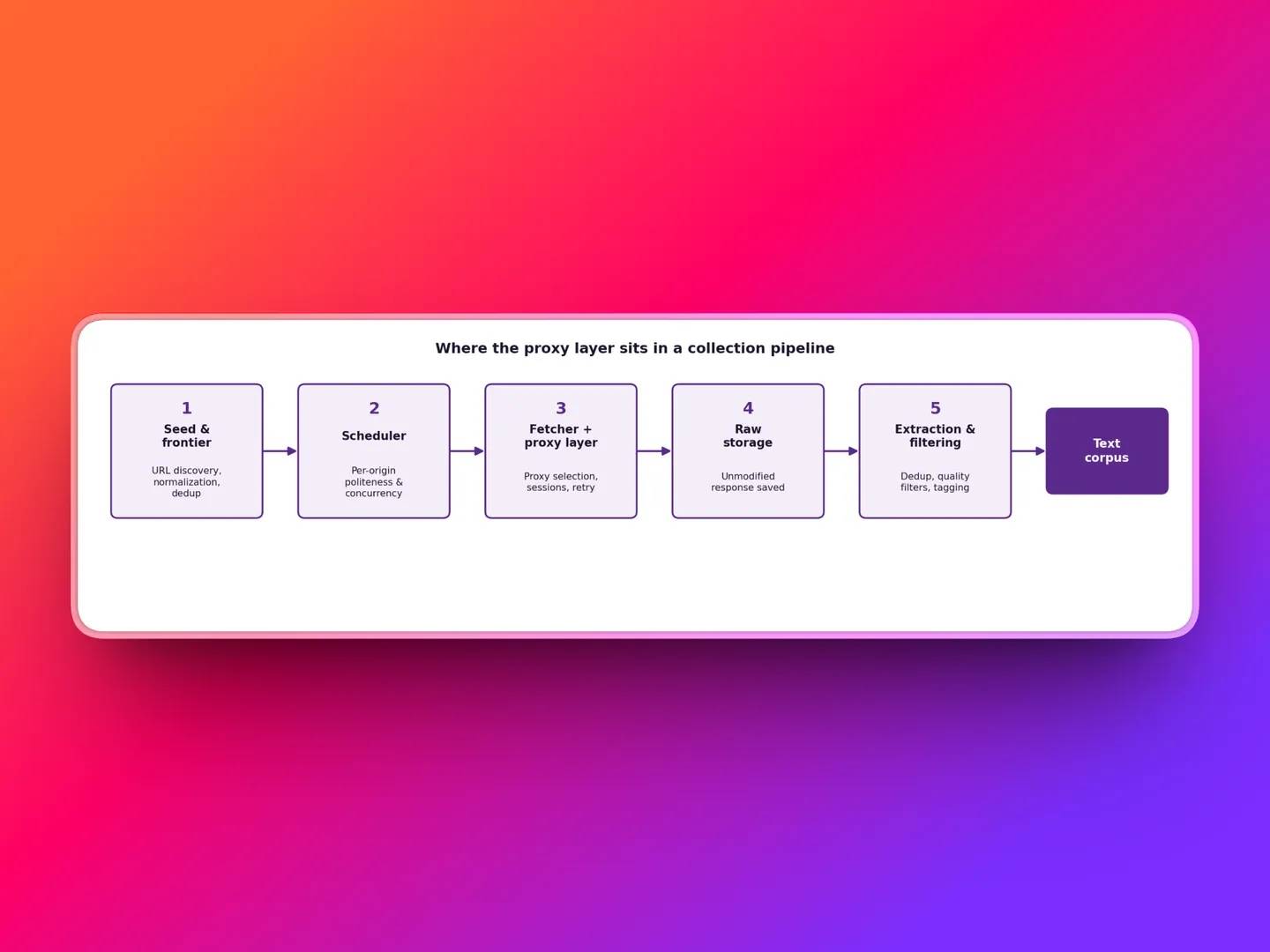
- Seed and frontier. Discovers source URLs, normalizes them (stripping tracking parameters, resolving relative paths), and deduplicates the frontier, the queue of soon-to-be-fetched URLs, before anything goes out. Catching a duplicate at this stage costs only a single hash lookup instead of a wasted fetch.
- The scheduler. Sets per-origin politeness (how long to wait between requests to the same domain), a concurrency cap per origin, and a backoff policy that triggers per domain rather than globally.
- The fetcher and proxy layer. Handles proxy selection for that origin, session strategy, and retry behavior. Route every failed request through a new exit IP rather than retrying through the same one.
- Raw storage. Keeps the unmodified response before any parsing touches it. Reprocessing a stored page later, once extraction logic improves, is free. Refetching it isn't free.
- Extraction and filtering. Turns raw HTML into filtered, deduplicated text.
Track a rolling success rate per domain and use it to automatically trigger the escalation from the previous section, instead of monitoring dashboards by hand. Rotate the exit IP on every retry rather than simply waiting. On a target that's blocked at the network level, an unbounded retry loop burns bandwidth for a result that was never coming.
For the implementation side, see building and scaling crawlers in Python, how crawling differs from scraping for the terminology, and retry and backoff patterns in Python for the retry logic.
Turning fetched pages into training-ready text
Fetching a page successfully isn't the same as collecting usable data. Most of what a crawler pulls down doesn't belong in a training corpus, and the gap between raw HTML and a clean, filtered document is where a large share of a corpus gets lost. Do the following while turning fetched pages into training-ready text:
- Boilerplate removal. Strips navigation menus, footers, cookie banners, and comment sections, which make up most of the bytes on many pages.
- Duplicate detection. This runs in 2 layers. Exact hashing compares a hash of the full page and catches mirrored pages. Then, Shingling and MinHash compare overlapping chunks of text instead, which catches near-duplicates: syndicated articles, templated product pages, anything that differs only slightly. Near-duplicates are the bigger problem at web scale, because exact copies are rare and templated content is everywhere.
- Quality filtering. Removes documents that fall below a minimum length, carry a stopword ratio i.e the share of common filler words like "the" or "and" outside a normal range, have a high symbol-to-word ratio, or exhibit excessive repetition. Each filter typically targets a different failure mode: short documents are often navigation stubs, a low stopword ratio often means a wall of code rather than prose, and repetition usually flags a collection error that returns the same block.
- Language identification. Tag each fetched document by language; it will be useful to measure the composition of your training data.
- Provenance metadata. This should follow every document that survives filtering. It implies documenting the source URL, the fetch timestamp, the exit country used to collect it, and any content license signal found on the page.
A filtered, deduplicated, provenance-tagged text corpus is the deliverable of a collection pipeline. Afterward are tokenization, training, fine-tuning, and evaluation, whose processes and tooling are covered in training a model on your own collected data.
See what data cleaning involves and why it matters and how HTML parsing works during boilerplate removal.
When raw proxies stop being enough
Most of a text corpus crawl runs fine on raw proxies. A smaller set of targets won't. These 4 signals mean a target has outgrown a raw proxy setup:
- The content only appears after JavaScript runs, so a raw HTML fetch returns an empty shell.
- The target screens the TLS handshake itself, the encrypted connection setup, not just the IP address.
- The target presents an interactive challenge, such as a CAPTCHA, before allowing the request through.
- The target tracks behavior across a session, such as mouse movement or click patterns, and blocks sessions that look automated.
However, a managed scraping API absorbs all 4 of these: it renders JavaScript, manages browser fingerprints, solves or bypasses challenges, and handles retry orchestration.
Without a managed API, you maintain the stealth stack yourself: fingerprint spoofing and challenge-solving logic that needs continuous upkeep as detection methods change. That engineering time is a recurring cost, and it rarely appears next to the per-request price.
Escalate the specific domains that fail these checks, and leave the rest of the corpus on proxies. A hybrid setup, where 90% of a corpus runs on proxies and the remaining, harder 10% runs through a managed API, is usually the right architecture. When a target hits one of the 4 signals above, Decodo's Web Scraping API handles rendering, fingerprinting, and challenge-solving for that specific origin, so the rest of the pipeline continues to run through raw proxies.
A common version of the JavaScript and challenge signals is a Cloudflare-protected origin; see bypassing Cloudflare's anti-bot protection for what that involves, and how to get past CAPTCHA challenges when scraping for the interactive-challenge case directly.
Ethical and legal considerations for LLM training data
For anyone assembling a training corpus at scale, sourcing provenance and legal exposure are an engineering and procurement decision with real consequences.
- Where proxy IPs come from matters as much as how many you have. Providers that source IPs with explicit consent carry a far lower risk profile than vendors that hide proxy software inside unrelated apps without disclosing it. In 2026, Google obtained a court order to dismantle IPIDEA, a residential network that enrolled exit nodes through SDKs bundled into unrelated apps without the device owner's knowledge. See why ethical IP sourcing matters for a closer look at the situation.
- robots.txt directives and published crawl policies signal what a site owner is willing to have crawled. Honor them at the scheduler, meaning your crawler checks and respects them before a request goes out, rather than at the fetcher after the request has already landed. Document which policy version you checked and when, since sites update these policies and a decision made 6 months ago may no longer hold.
- Content licensing and copyright. Publicly accessible isn't the same as freely usable. A page without a login wall can still include licensing terms that restrict reuse. Capture whatever license signal a page provides (a Creative Commons tag, explicit terms of use, a syndication notice) at collection time. Reconstructing that signal after a document is already in a corpus is far harder and sometimes impossible.
- Auditability. Capture the source URL, fetch date, exit country, and license signal during extraction, and keep them intact. It’s useful to have it for future reference if needed for any clarification on the data collection process.
- Personal data. This needs to be detected and removed at the filtering stage, before it enters the corpus, not after. For more information regarding the legalities of web scraping, see our guide on what the law says about web scraping.
Notably, Decodo (previously known as Smartproxy) co-founded the Ethical Web Data Collection Initiative in 2023. It's an i2Coalition consortium of web data collectors, and its published principles cover legality, ethics, ecosystem engagement, and social responsibility.
Common mistakes when scaling LLM data collection
- Running the entire crawl on a fixed proxy tier. For example, using residential proxies throughout your collection process simply because the first target needed them is not ideal, as other targets may have different levels of complexity that might not require residential-level proxies. So do your research on the retrieval complexity of your domains before crawling and choosing proxy tiers.
- Discarding raw responses after parsing. You might discover a parsing bug or error that requires you to rerun the parsing URL. If you discard data after cleaning, you will have to refetch it, especially if you discover that certain data is missing or corrupted during parsing.
- Neglecting per-origin concurrency limits. Setting concurrency limits globally rather than per origin results in both wasted capacity and unnecessary blocks. Some sites tolerate more concurrency than your global setting allows, leaving capacity unused. Others tolerate less, so you degrade their service and earn an IP ban.
- Deduplicating only at the end. Deduplicating late makes you pay full bandwidth for content you already have. Avoid duplicating content that already exists by implementing layered deduplication before fetching, after fetching, and before sending to downstream parsers.
- Focusing only on headless browser rendering. Rendering every page in a headless browser when the server returns usable HTML multiplies both bandwidth and compute for no gain. So, perform background checks on your target site to apply the appropriate data collection infrastructure.
- Falling into honeypot traps. These are web scraping traps that arise from relying on generic IP rotation while ignoring behavioral and client-side anti-bot defenses. For example, clicking on invisible links only crawlers can see and manifesting AI fingerprinting patterns are common honeypot traps during LLM data collection.
- Not recording provenance. Not recording where, when, and how each piece of data was collected, such as the exact source URL, timestamp, HTTP response headers, crawl configuration, and so on, is an ideal practice. Failing to record provenance makes the corpus impossible to audit and retract when necessary.
Final thoughts
Proxy selection is a cost-and-coverage decision made per target domain, not a once-and-for-all product choice for the whole pipeline. Run every origin on the cheapest tier that clears it, track the success rate, and escalate only the domains that fail.
That's what keeps a corpus crawl affordable. Most of it runs on datacenter IPs; a subset moves to residential proxies; and only the handful of origins that render client-side or pose challenges need a managed API layer. Collection quality dictates corpus quality, which determines model quality. Start with Decodo's LLM data collection tools, which cover all proxy layers for your use cases.

Get residential proxy IPs
Claim your 3-day free trial of residential proxies and explore full features with unrestricted access.
About the author

Mykolas Juodis
Head of Marketing
Mykolas is a seasoned digital marketing professional with over a decade of experience, currently leading Marketing department in the web data gathering industry. His extensive background in digital marketing, combined with his deep understanding of proxies and web scraping technologies, allows him to bridge the gap between technical solutions and practical business applications.
Connect with Mykolas via LinkedIn.
All information on Decodo Blog is provided on an as is basis and for informational purposes only. We make no representation and disclaim all liability with respect to your use of any information contained on Decodo Blog or any third-party websites that may belinked therein.