Proxy Integration with ScrapeBox
Elevate your web scraping and SEO game with Decodo’s residential proxies and the ScrapeBox tool.
14-day money-back option
Elevate your web scraping and SEO game with Decodo’s residential proxies and the ScrapeBox tool.
14-day money-back option
115M+
ethically-sourced IPs
#1
response time
99.92%
success rate
99.99%
uptime
<0.5s
response time
ScrapeBox is a go-to tool for public data collection and SEO. It allows you to gather and extract web data, automate tasks like harvesting URLs, conduct competitor research, build links, and so much more.

Quick multi-threaded operation
Experience lightning-fast performance with the ability to handle multiple simultaneous connections seamlessly.

Simple customization
Access various options and enjoy customization to suit your unique needs – all at a pocket-friendly price.

Numerous features add-ons
Unlock hundreds of features and over 30 free complimentary add-ons to enhance the tool and your SEO strategy.

A residential proxy is an intermediary that allows users to get a real IP address from an authentic household device connected to a local network.
Decodo offers residential proxies with 115M+ HTTP(S) and SOCKS5 IPs in 195+ locations. Enjoy <0.5s response time, 99.92% success rate, 99.99% uptime, and unlimited threads and concurrent sessions. Feelin’ unsure? Test our residential proxies with a 3-day free trial or go for a flexible Pay As You Go payment option.
First, let’s begin by visiting the official website of ScrapeBox to download the app. Once we have it downloaded, we can proceed to get things going.
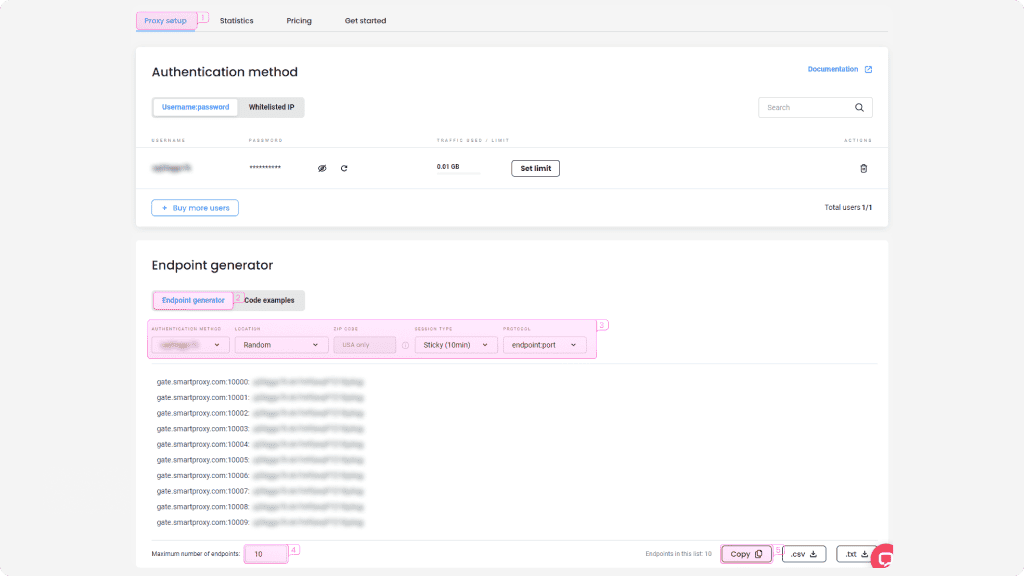
Log in to your Decodo dashboard, find residential proxies by choosing Residential under the Residential Proxies column on the left panel, and select a plan that suits your needs. Then, follow these steps:
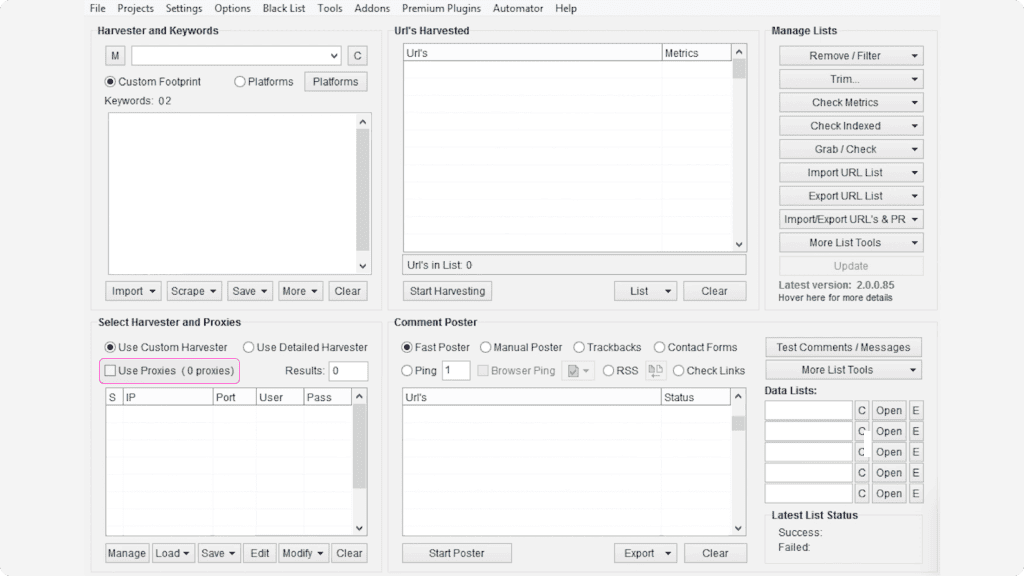
After you’ve got your endpoints, you can pair residential proxies with ScrapeBox.
1. Open ScrapeBox.
2. Check the Use Proxies checkbox in Select Harvester and Proxies settings.
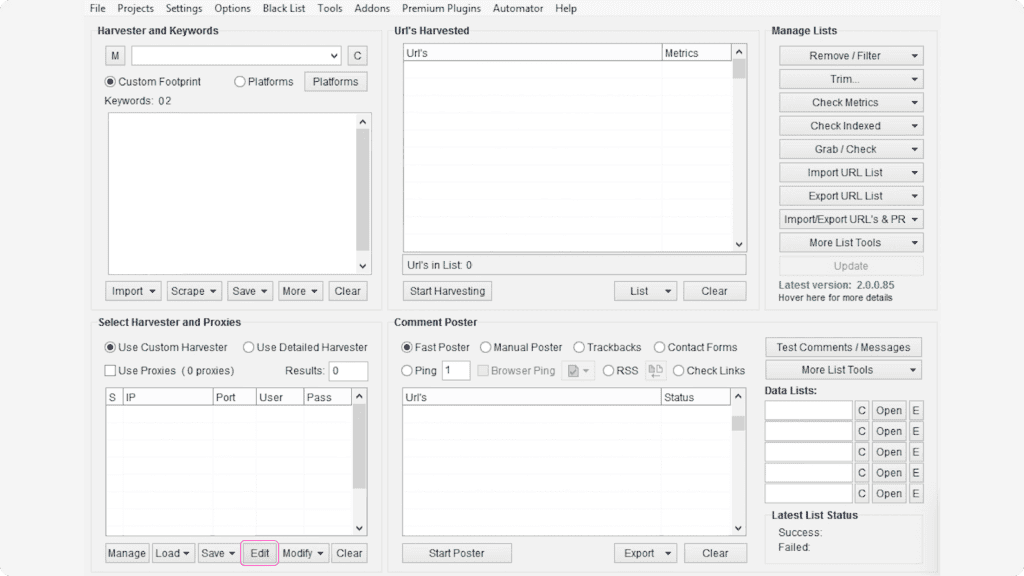
3. Click the Edit button found in the same settings menu to start setting up your proxies.
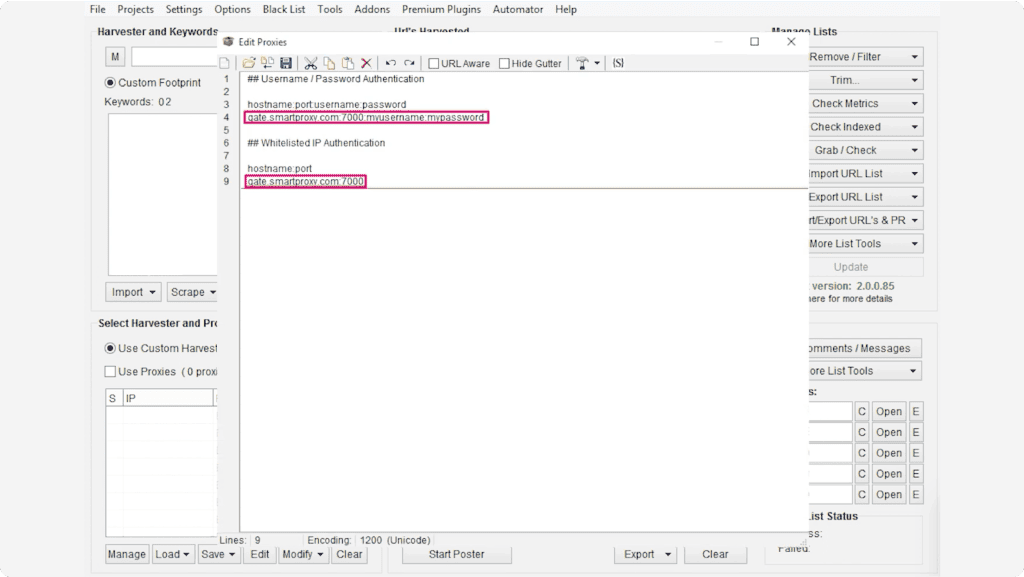
4. Depending on the authentication method you would like to use, type in the information of your chosen proxy authentication methodauthentication method as in the example below:
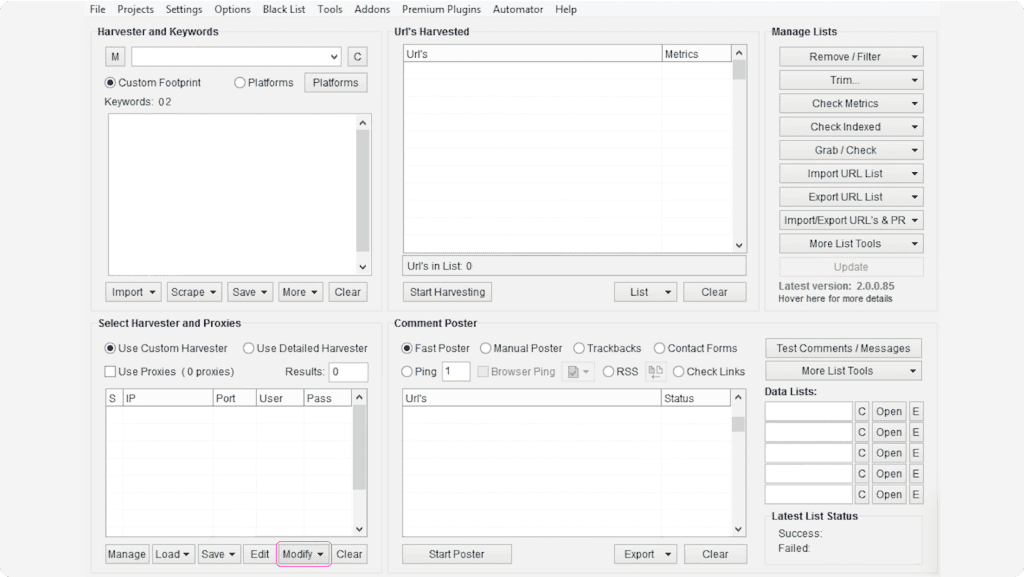
5. Save the proxy settings and you should see them appear in the Select Harvester and Proxies settings.
6. Select all the proxies you’ve entered and click the Modify button.
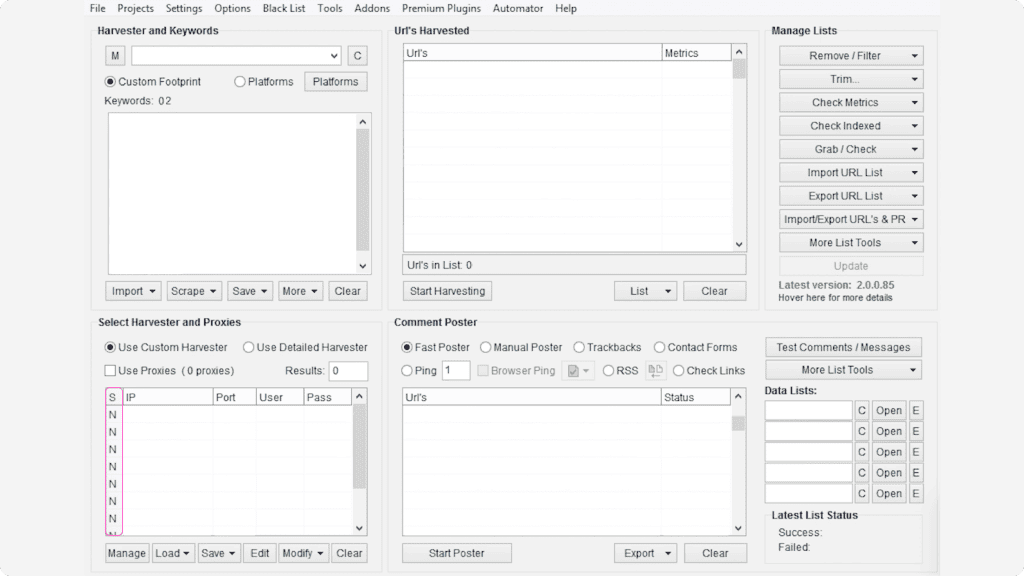
7. Select the option Mark all Proxies as Non-Socks proxies. If done correctly, you should see the letter “N” under each entered proxy in the “S” field in the proxy table.
8. Configure the rest of your ScrapeBox settings and run a test. To do this, check if the Harvester Status shows “Proxies Enabled”.
NOTE: Make sure you’re not checking the proxy status in the Proxy Editor itself, as you'll get a negative result. This happens because ScrapeBox doesn't support checks on backconnect proxies used by Decodo.
Easy Decodo proxy setup with popular applications and third-party tools. Check out these guides to get started right away.
Pick a plan that suits you. Get ahead with unblockable and stable proxies.
With each residential proxy plan, you access:

115M+ ethically-sourced IPs in 195+ locations
HTTP(S) & SOCKS5 support
Continent, country, state, city, ZIP code, and ASN-level targeting
Rotating and sticky session options
<0.5s avg. response time
99.92% success rate
99.99% uptime
Seamless integration with scraping tools and bots
24/7 tech support
14-day money-back
SSL Secure Payment
Your information is protected by 256-bit SSL

We're thrilled to have the support of our 135K+ clients and the industry's best.

Attentive service
The professional expertise of the Decodo solution has significantly boosted our business growth while enhancing overall efficiency and effectiveness.
N
Novabeyond
Easy to get things done
Decodo provides great service with a simple setup and friendly support team.
R
RoiDynamic
A key to our work
Decodo enables us to develop and test applications in varied environments while supporting precise data collection for research and audience profiling.
C
Cybereg
Featured in:





What are proxies?
A proxy is an intermediary between your device and the internet, forwarding requests between your device and the internet while masking your IP address.

Residential Proxies
from $2/GB
Real, physical device IPs that provide a genuine online identity and enhance your anonymity online. Learn more

ISP Proxies
from $0.27/IP
IPs assigned by Internet Service Providers (ISPs), offering efficient and location-specific online access with minimal latency. Learn more

Mobile Proxies
from $2.25/GB
Mobile device based IPs offering anonymity and real user behavior for mobile-related activities on the internet. Learn more

Datacenter Proxies
from $0.020/IP
Remote computers with unique IPs for tasks requiring scalability, fast response times, and reliable connections. Learn more

Site Unblocker
from $0.95/1K req
A powerful application for all proxying activities offering dynamic rendering, browser fingerprinting, and much more. Learn more
Build knowledge on residential proxies, or pick up some dope ideas for your next project - our blog is just the perfect place.
Most recent
IPv4 vs. IPv6: Key Differences and Which One to Use
Understanding IPv4 vs. IPv6 is essential as the internet's aging infrastructure strains and legacy IPv4 runs out of room. IPv6 steps in as the long-term solution, offering a virtually limitless address space, built-in security, and efficient routing. This article explores their key differences, core benefits, and the practical challenges of transitioning.

Justinas Tamasevicius
Last updated: Sep 25, 2026
8 min read
Most popular

How to Scrape GitHub: A Practical Tutorial 2026
GitHub is one of the most significant sources of technical knowledge on the internet, especially for developers building intricate applications. Follow this guide to learn how to extract this valuable data and effortlessly follow the latest tech trends.
Zilvinas Tamulis
Last updated: Jan 08, 2026
10 min read
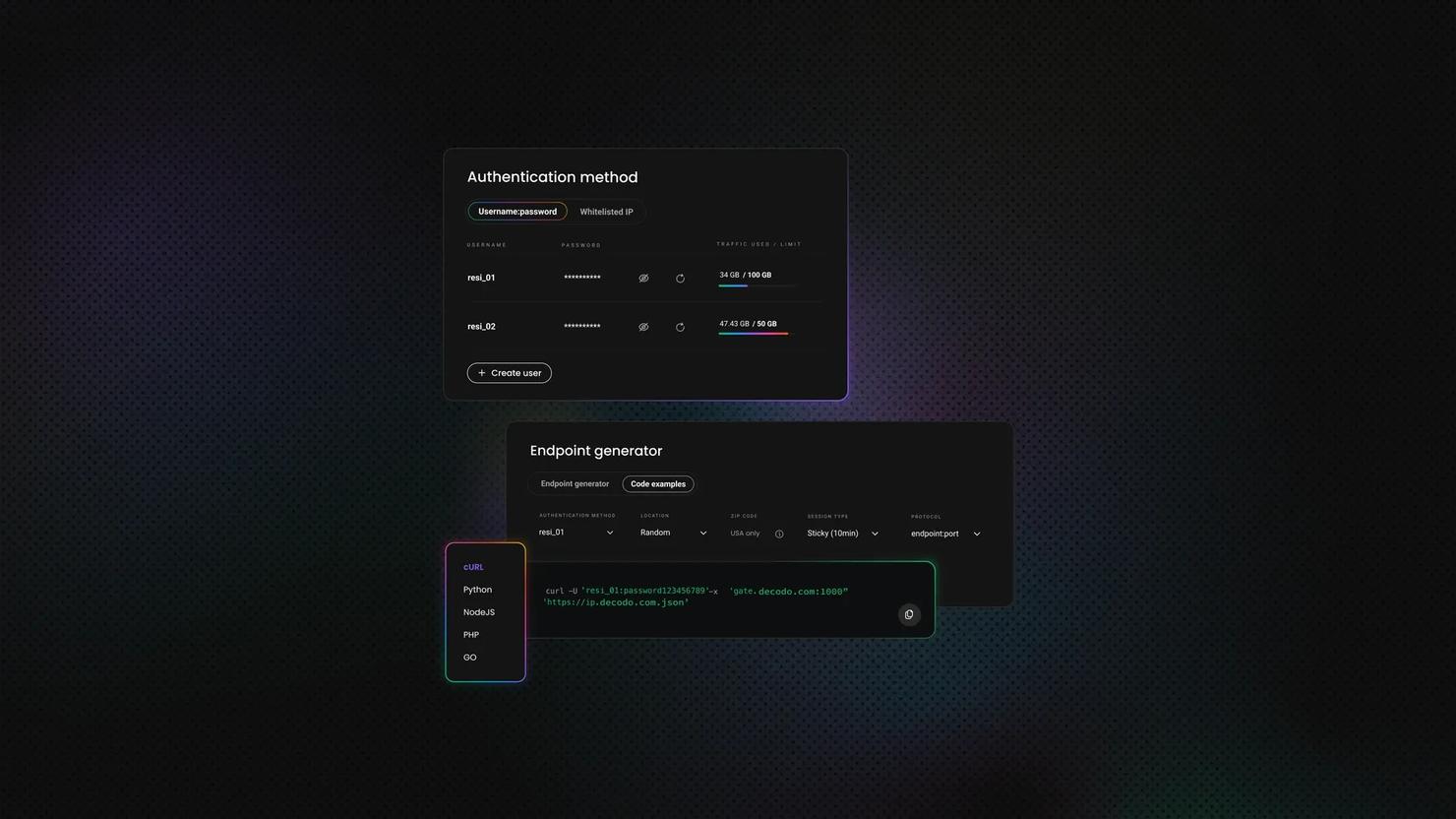
How to Send a POST Request With cURL?
Sending a POST request with cURL is a common task in web development and API interactions. When making a POST request, cURL allows you to send data to a server, often to submit forms or interact with APIs. Understanding how to craft and send POST requests using cURL is essential for testing APIs, debugging, and automating web interactions.
In this guide, we'll explore how to use cURL to send POST requests effectively, with information updated to reflect the latest version of cURL and its current best practices.
Zilvinas Tamulis
Last updated: Aug 21, 2024
8 min read

Ad Verification Best Practices: A Comprehensive Guide
According to Markets and Markets research, the AdTech market is projected to grow from $579.4B (2023) to $1496.2B by 2030, with an annual growth rate of 14.5%. As the ad verification landscape accelerates, so does the need to collect publicly available real-time data.
In this guide, we’ll explore the essential strategies and techniques required to maintain ad integrity, combat fraud, and maximize campaign performance in this ever-changing industry. Our marketing experts gathered all the best practices
Vilius Sakutis
Last updated: Mar 25, 2024
6 min read
ScrapeBox is a software that automates the process of gathering data from websites.
The ScrapeBox tool is designed for use cases such as web scraping and SEO.
Be aware that any tools mentioned in this article belong to a third party, not Decodo. Therefore, Decodo will not be responsible for any of the services offered by the third-party. Make sure to thoroughly review the third-party’s policies and practices, or do your due diligence, before using or accessing any of their services.
Dive into a 115M+ ethically-sourced residential IP pool from 195+ locations worldwide.
14-day money-back option